

 Reply With Quote
After some digging on this forum I found a solution:
edit /etc/fstab to include the following
/dev/hda1 /win vfat defaults,umask=0 0 0
group and others now have rwx permissions.
Thanks to newiaqua in Bulgaria for your earlier post.


After doing hd-install, there is no longer any icon for windows partition-fine.
I created a /win directory and chmod 755 for it. I vi'd /etc/fstab to read:
/dev/hda1 /win vfat defaults 0 0
When the system boots up and /dev/hda1 is mounted, group and other permissions revert to read only. When I umount the windows partition, the changes I made earlier to allow r-x for group and others is back!?! When I remount, the permissions change back to r-- for group and others! I've done this in vt and in kde gui and it still does the same things.
I've modified the /etc/fstab every which way I can think of
/dev/hda1 /win vfat auto,user,rw,exec 0 0 ---- no joy
/dev/hda1 /win vfat defaults,rw,exec 0 0 ------no joy
Is there something screwy w/ mount command that only allows mounted filesystems to be accessed by root only- even though root assigns permissions to other users? I'm pulling my hair out on this one. Otherwise I really love this distro.
After some digging on this forum I found a solution:
edit /etc/fstab to include the following
/dev/hda1 /win vfat defaults,umask=0 0 0
group and others now have rwx permissions.
Thanks to newiaqua in Bulgaria for your earlier post.
thx a lot! i was having problems with this one too!!!
 Posting Permissions

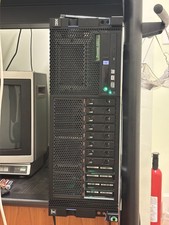
IBM POWER8 8286-42A S824 8-Core 128GB RAM 4.8TB SAS Fedora Linux Server PowerVM
$750.00

Lot of 2 IBM blade center Type H chassis 8852
$559.00

IBM 7915 AC1 M4 E27R704 Server Intel 2650V2 32GB RAM NO HDD w/ 2x 750w PSU
$200.00

IBM QRadar xx29 2x Xeon E5-2650v4 2x 900W PSU M5120 12x 3.5" Bay Server No RAM
$149.99

IBM Power S822 POWER8 1x CPU 32GB DDR4 RAM 2U Rack Server No HDD.
$629.99

IBM Power S922 9009-22A Power9 DDR4 10GbE 6X SFF Barebone Server
$999.95

IBM Power 8 S822L Server 8247-22L POWER8 Enterprise 256GB RAM 2x 00KV626 CPU
$999.99

IBM SYSTEM X3500 M3 SERVER 7380AC1 TOWER Server XEON E5620 8GB RAID SEE NOTES
$108.92

IBM System X3650 M3 Server Xeon E5620 2.4 GHz 16 GB Ram Raid M5015 No OS No HDD
$87.96

IBM QRadar xx29 M4 2x Xeon E5-2670 2.6GHz 16-Cores | 64gb | M5120 RAID
$349.99