

 Reply With Quote
I don't know about tar.gz files, but for a straight *.rpm file typing 'rpm -i <filename>' in a root console worked for me. Try it with the tar.gz, if it doesn't work gunzip and untar it first.
HTH
- - Edwin


I frequently use several programs that are not available as .debs (I used Red Hat before Knoppix.) I am used to using RPM to compile from a tar.gz; how is this done with dpkg?
I don't know about tar.gz files, but for a straight *.rpm file typing 'rpm -i <filename>' in a root console worked for me. Try it with the tar.gz, if it doesn't work gunzip and untar it first.
HTH
- - Edwin
I guess I wasn't clear. I want to use programs that are neither available as .debs or rpms. In my old Red Hat, I simply compiled these programs under RPM with -ta option and got a RPM that I could install with rpm -i progname.
How do I compile a source tarball under Knoppix so I end up with a .deb which I can install so it is seen by the database?
Read your post earlier today and read this a few minutes ago and thought it might be just what you are looking for checkinstall will make a debian package and install it using dpkg.Originally Posted by annamerikin
Did some reading of the man pages for dpkg and dpkg-deb. It appears that "dpkg-deb -b" will do what I want. Except for the control files, which are not explained in the man pages. So:
Where can I learn about the internals of the dpkg and dpkg-deb systems -- specifically how to build a control tree?
BTW, thanks for the link to checkinstall. I tried it some time ago for help in compiling under rpm, but it installed the packages it built with the --force --nodeps option (equivalent to deb -force -nodepends) which almost guaranteed no installation information output and a broken installation.
Ah I see you are looking for some light reading I would suggest going to the source so to speak the basic Debian package management system FAQ there's more than enough here links to get you started. Also the Debian docs page and the lists page the Debian user list is a great source of information although it is a high volume list (250-400 e-mails a day) but you can read it in a news reader if you do not want that many e-mails.
HTH
try "apt-get install alien", followed by "man alien"...... think this will do what you are looking to do.
Oh, forgive me, can't remember if it comes with Knoppix, if it does forget the first part :P
 Posting Permissions


Dell PowerEdge FC430 Blade Server 2x Xeon E5-2630v4 20 Cores FX2 FX2s No RAM/HDD
$119.99

Dell PowerEdge FX2s + 8x FC430 Blades 16x E5-2630v4 160 Cores Rails No PSU/RAM
$699.00

Dell PowerEdge M630 Blade Server 2x Xeon E5-2680 v4, 2F3MP , 4GDP5 ,R10KJ ,JVFVR
$96.60

AS IS READ DESCRIP. Supermicro SuperServer 6026TT-HIBQRF 12-Bay 4x X8DTT-HIBQF
$215.00

NETAPP HCI NAF-1701 SuperMicro Server 4X BLADE H410C 8X GOLD 5120 - 4X S25G NICs
$1999.97

Dell PowerEdge VRTX Rackmount Chassis w/4x PSUs 2x CMC Modules
$399.98
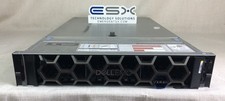
Dell R740XD VxRail P570 24x 2.5” 2U CTO Server– 2x Gold 6240, H740p, 2x 1600W
$699.00

Cisco B200 M3 2x E5-2670V2 10 Core 8x 16GB-128GB Ram Blade Server VIC1240 14900R
$399.00

Dell Poweredge VRTX 25Bay 2.5" 2x PERC 8, 2xCMC, I/O 1GB Pass Through, 4x PS
$578.08

Lot of 3 Dell PowerEdge Blade Server HHB005 x2 HHB006 x1
$256.49