

 Reply With Quote
From memory the virtual terminals are started from /etc/inittab. You might be able to modify this file to disable the virtual terminals. Terminals are usually started by getty or similiar.


Hello,
How does one go about disabling the Virtual Terminal? I just want to see an image basically once 'X' gets loaded up. I know I can do this by Compiling a new 2.4.20 Kernel, but from what I have read its a pain in the butt and from early tests, it has failed for me.
So, one, is there an easy way out of this by sending a Kernel Boot Parameter to disable this?
If not and I need to build a new kernel, where can I get the appropriate XFS Patch? And once applied, I just do the normal make dep clean bzimage modules modules_install install and overwrite the vmlinuz in the boot.img with the new or? Thanks for all help in advance.
mark
From memory the virtual terminals are started from /etc/inittab. You might be able to modify this file to disable the virtual terminals. Terminals are usually started by getty or similiar.
From memory the virtual terminals are started from /etc/inittab. You might be able to modify this file to disable the virtual terminals. Terminals are usually started by getty or similiar.
I checked ou the inittab like you said, but unless I am 'blinded', I didn't fiind what I was looking for so I just proceded with building a new kernel which worked in full success. And for those out there searching how to build a new kernel, I personally found it to be surprising easy and successfull compared to some other post.
Here's what I did for reference:
Downloaded Linux-2.4.20.
Added the XFS Patch
Configured Kernel from Previous Config and then Modded
Loaded Knoppix Patch in /usr/src dir
make dep clean bzImage modules modules_install
cp arch/i386/boot/bzImage /boot/vmlinuz-2.4.20 (i'm fairly sure this is the command)
cp System.map /boot/System.map-2.4.20
Took the boot.img file, and mounted it (mount -t msdos boot.img boot -o loop=/dev/loop0 )
replaced the vmlinuz file with the newly created one.
unmount boot
Replace boot.img with the newly made one
Recreate ISO Image and vwal
NOTE: Some Information taken from the Docs Section ffrom the KernelCustomize Howto and KnoppixRemastering Howto.
 Posting Permissions


Apple Macintosh Classic M1420 Vintage Desktop Computer Model Macintosh Classic
$100.00

Vintage 1998 iMac G3 M4984 Mac OS + Keyboard Working but Needs Some Repair Read
$295.00

Apple Power Macintosh PowerPC 7300/200 VTG w Keyboard Mouse Storage Drive Read
$199.99
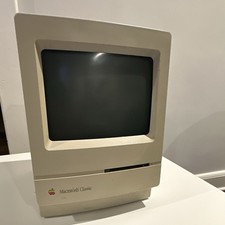
Apple Macintosh Classic M1420 Vintage All-in-One Desktop Computer
$95.00

Vintage Apple Macintosh Plus Desktop Computer - M0001A
$150.00
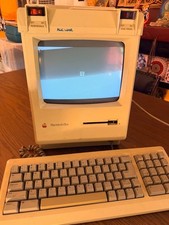
Vintage Apple Macintosh Plus Desktop Computer - M0001A
$155.00

185--Sonnet Crescendo G3 PPCG3-375-5-K-06 G3 Add-On Card for Vintage Mac
$99.00

LARGE LOT Vintage Apple Macintosh Mouse Cables Accessories SCSI etc - UNTESTED
$80.00

Apple Macintosh DuoDock Duo Dock M7779 & Powerbook 230 Vintage Mac RARE Vintage
$249.00

2001 Apple iMac G3 600MHz DV M8492LL/A in Strawberry shell Vintage Mac OS PPC 9
$349.99