-
Senior Member
registered user
Thanx for all you help an patience, c123 and garyng, but I'm still clueless!
I tried everthing you two said to do. For some reason I only get localhost:7 to connect (I created 6 other vncservers before succeeding) but after connecting I don't get a KNOPPIX desktop. Isn't that what I'm supposed to get so I can manipulte KDE apps remotely in WIMPdoze?
BTW, I know localhost:7 works as I can use it from another PC on the LAN when both PCs are running KNOPPIX. In fact, the password it asks for is the userid passwd! I found a hidden dir called .vnc with a file in it called passwd. When I tried to open it in KATE, it had one word in weird characters I could not decifer.
TIA,
AJG
-
Senior Member
registered user
the vnc password is encrypted so you need the tool (vncpasswd) to change it.
what window manager/desktop manager is launched depends on your system setup(.xsession etc. in the home directory) I have installed fluxbox and have no problem having it launched. what desktop you get when you do a 'startx' locally on that linux machine ? From the vnc perspective, it is no different than starting a local X server, just the display protocol is different (one to video card for XFree86, one to memory buffer and then remote for vnc). One thing I don't like to use KNOPPIX as a HD installation is that it has its own way of arranging things meaning learning yet another set of convention on top of the debian convention which by itself is already different from the convention used in the raw package like XFree86.
why it needs to go till :7 is beyond me. But as far as I know, they use /tmp/.X11/ to find out empty slot for the display. So it may be that it sees some left over there.
Similar Threads
-
By toxic_d in forum Hardware & Booting
Replies: 5
Last Post: 05-31-2004, 03:16 PM
-
By A. Jorge Garcia in forum General Support
Replies: 0
Last Post: 05-16-2004, 03:17 PM
-
By torbu in forum General Support
Replies: 2
Last Post: 05-16-2004, 11:33 AM
-
By turbines in forum Hdd Install / Debian / Apt
Replies: 3
Last Post: 04-17-2004, 04:40 PM
-
By sn0wflake in forum General Support
Replies: 3
Last Post: 12-01-2003, 11:03 PM
 Posting Permissions
- You may not post new threads
- You may not post replies
- You may not post attachments
- You may not edit your posts
-
Forum Rules


Samsung 256GB SSD MZ-JPV256S/0A2 PCIe Solid State Drive SSD SSUBX 655-1959A
$22.02

Samsung Galaxy View 18.4'' 64GB GSM AT&T 58777 13
$664.99

Samsung Galaxy Tab Active 3 / 64 gig/ WIFI/ IP68 Rated
$99.00

Genuine OEM Samsung CLT-C504S Cyan Laser Printers Toner Cartridge
$50.00

RAM-HOL-SAM52CPU RAM USB-C Powered Dock Samsung Tab Active4 Pro & Tab Active Pro
$81.99
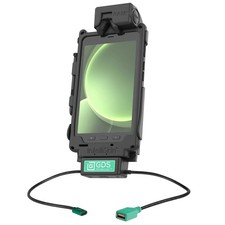
RAM-GDS-DOCK-SAM62CDU RAM GDS Tough-Dock + Single USB-A Samsung Tab Active5 & 3
$241.99

RAM-GDS-U1-SAM90-KIT5 RAM GDS Uni-Conn USB-C & USB-A for Samsung Tab Active5
$407.99

3 -M.2 2280 512GB SSD - Samsung MZNTE512HMJH, MZNLN512HMJP, Toshiba KSG60ZMV512G
$155.00

Samsung Galaxy View 18.4'' 64GB GSM AT&T 58777 14
$664.99

Samsung Galaxy View Tablet 18.4 SM-T670/677A Digitizer 100% Original Oem
$152.99



 Reply With Quote