

I finally figured out how to do this a few minutes ago. (In defense of my apparent idiocy, no guide told me how, just said you can have multiple desktops.)
It's actually pretty simple; right click your screen, selct configure desktop, select background and uncheck "common background". If you want a wallpaper for each desktop just select "single wallpaper" or "multiple wallpapers".
To set up more or less than the default 4 desktops, select multiple desktops and adjust the slider. You can even give each desktop a different name.
Hope that helps someone who was as puzzled about that as I was.
 Posting Permissions


OPNsense pfSense 8-Core Atom C3758 2.2GHz 8GB DDR4 64GB SSD 8x NIC QAT AES VPN
$145.00

KTN-STL3 EMC VNX 15-slot Disk Array Expansion, full 15 x 2tb drives 100% health
$360.00

Ubiquiti UniFi Gateway Max Router - 5x 2.5GbE - IDS/IPS 2.3 Gbps - UXG-Max
$180.00

Ubuntu Server 26.04.1 LTS Bootable USB Flash Drive – Latest September 2026
$13.99

CHEECENT CR202 WiFi USB Print Server 2-Port for Windows, Mac, Linux
$64.99

Microsoft SQL Server 2025 Standard 32 Core Unlimited CAL Retail License Package
$299.00

Start9 Server Pure 32GB 4TB Intel i7 Node StartOS — Box + PSU
$649.00
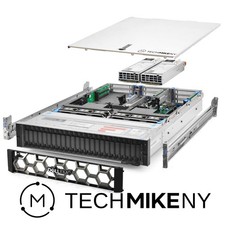
Dell PowerEdge R740xd Server 2.8Ghz 32-Core 384GB RAM 3.2TB Storage Debian Linux
$5969.95

NVIDIA Jetson TK1 + Intel NUC Compute Cluster Tray w/ Netgear 16-Port Switch
$499.99

SQL Server 2022 Enterprise 96 Core License & DVD Unlimited CALs with CoA
$284.99


 Reply With Quote