-
Senior Member
registered user
How do I add an image to a post?
These instructions are pure bogus!!!!!!
There is no manage attachments anywhere!!!!
http://knoppix.net/forum/faq.php?faq...eading_posting
It says...
How do I attach a file to a post?
To attach a file to your post, you need to be using the main 'New Post' or 'New Thread' page and not 'Quick Reply'. To use the main 'New Post' page, click the 'Post Reply' button in the relevant thread.
On this page, below the message box, you will find a button labelled 'Manage Attachments'. Clicking this button will open a new window for uploading attachments. You can upload an attachment either from your computer or from another URL by using the appropriate box on this page. Alternatively you can click the Attachment Icon to open this page.
To upload a file from your computer, click the 'Browse' button and locate the file. To upload a file from another URL, enter the full URL for the file in the second box on this page. Once you have completed one of the boxes, click 'Upload'.
Once the upload is completed the file name will appear below the input boxes in this window. You can then close the window to return to the new post screen.
What files types can I use? How large can attachments be?
In the attachment window you will find a list of the allowed file types and their maximum sizes. Files that are larger than these sizes will be rejected. There may also be an overall quota limit to the number of attachments you can post to the board.
If you have uploaded an image as an attachment, you can click the arrow next to the 'Attachment Icon' and select it from the list. This will be inserted into your post and can be located where you want it displayed.
To include an image that is not uploaded as an attachment and is located on another website, you can do so by copying the full URL to the image, (not the page on which the image is located), and either pressing the 'Insert Image' icon or by typing [img] before the URL and [/img] after it, ensuring that you do not have any spaces before or after the URL of the image. You can insert photos from your albums (?) in this way too.
-
Hi John,
Klaus Knopper acknowledged the problem of Knoppix 8.6.0 with the 32 bit kernel on the Debian forum and is working on it (Knoppix 8.6.1 to come).
It is kind of puzzling that the cloop module that is creating the problem is working just fine with 64 bit kernel and does break with the 32 bit kernel.
https://lists.debian.org/debian-knop.../msg00006.html
Best Regards,
Gilles
PS: I could not find a way to upload a pictures in this forum. Instead I stored them somewhere on a www server and used the web link to them.
 Posting Permissions
- You may not post new threads
- You may not post replies
- You may not post attachments
- You may not edit your posts
-
Forum Rules


DEC Digital DECmate III PC238 PDP-8 6120 RX50 Dual Floppy Vintage Computer
$649.95

Vintage Digital VR241-A color CRT monitor, powers on, DEC Rainbow or terminal
$150.00

Vintage DEC Digital Starion 200 Desktop PC Powers On Boots To BIOS NO HDD - DW
$299.99

Vintage DEC Digital T1043 DWMBB/B VAXBI XMI Adapter 5018232-01 C1 VAX Board
$109.99

Vintage DEC Digital Equipment Flip-Chip Module Lot Parts
$59.99

Vintage DEC Digital Equipment DELNI 8-Port Ethernet Local Network Hub VAXstation
$79.95
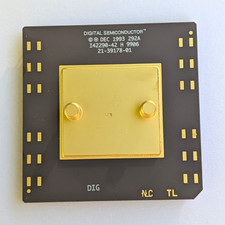
Vintage 1993 Digital Semiconductor DEC Ceramic PGA CPU – Alpha Era
$150.00

Vintage DEC LK201 Digital Equipment Corporation (DEC) LK201-AA Computer Keyboard
$149.99

Vintage DEC Digital XMI-A1 5017293-01A1 LWPR BE3-0 VAX Circuit Board T2012
$74.99

Vintage DEC/Mostek memory systems MK 8015 AA-00 6805-08015 1100 REV C(B7)
$279.99



 Reply With Quote