

 Reply With Quote
That's a useless error warning if you are really concerned you can install hwtools IIRC and then edit the /etc/init.d/hwtools file that will be created and the dma will get started earlier.Originally Posted by m_yates


During bootup, I get a warning from fsck saying hard drive dma is turned off and fsck will be very slow. The "bootmisc.sh" script turns on DMA, but apparently this is done after the "checkfs.sh" script that runs the fsck check. I haven't had to run fsck yet, but I'd like to correct the problem. Does anyone know how to turn on dma BEFORE fsck is run during boot up?
That's a useless error warning if you are really concerned you can install hwtools IIRC and then edit the /etc/init.d/hwtools file that will be created and the dma will get started earlier.
Thank you for the answer. I guess I won't worry about it, but now I know what to do to change things.
so how do you fix this error?
I have hdparm in bootmisc.sh
but it loads after like you said.
I've already said in the post above to be perfectly clear.
apt-get install hwtools next you would vi /etc/init.d/hwtools then uncomment the appropriate lines and comment out the lines in the bootmisc.sh then it gets started a little earlier.
 Posting Permissions


Intel Core i5-12500T SRL5W 2GHz 18MB 6 Core Socket LGA1700 Desktop CPU Processor
$114.99

Intel Core i7-8700 3.2 GHz 8 GT/s LGA 1151 Desktop CPU Processor SR3QS
$67.99

INTEL CORE I9-10940X X-SERIES PROCESSOR | 3.30GHZ | SRGSH
$179.99
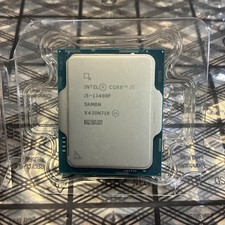
Intel Core i5-13400F 10 Core 16 Thread Processor SRMBN
$126.99

Intel SR3XE Core i5-8500 3.0GHz 9M Socket 1151 6-Core CPU Processor *Tested*
$32.99

Intel Core i7-3770K 3.5 GHz Processor
$39.00

Intel Xeon E3-1230 v3 SR153 3.3GHz Quad Core LGA 1150 CPU Processor
$14.49

Intel Core i7-7700K SR33A 4.20GHz 4-Core LGA1151 CPU Processor
$62.95

LAST BATCH *Brand New-Sealed* AMD Ryzen 9 9950X3D2 Dual Ed. 4.3GHz 16Core AM5
$768.00

Intel Core i5-4590T 2 GHz 5 GT/s LGA 1150 Desktop CPU Processor SR1S6
$10.99