

 Reply With Quote
cool... This helped me a lot. Thanks!


I've a Knoppix newbie (about 2 weeks experience), but I'm hooked!
One of the first things I wanted to do was connect to the Internet using my USB adsl modem (Fujitsu 310), but it wasn't clear to me how to do this. Tried ADSL configuration on the K-menu, but no joy. Looked around, couldn't find a "how-to" guide for newbies on this. However, I eventually worked it out, so thought that a step-by-step summary for other newbies might be useful. Note that, as a newcomer to Linux, I don't necessarily know _why_ some of these steps are necessary (e.g. "make" then "make install") or even if they _are_ all necessary. But they worked for me! So here goes:
(1) In Windows, download eciadsl-usermode-0.8.tar.gz from eciadsl.flashtux.org
(2) Boot KNOPPIX CD
(3) Create a persistent KNOPPIX home directory (under "configure" in KNOPPIX menu)
(4) Logout KNOPPIX
(5) Reboot KNOPPIX - type "knoppix home=/dev/hda1"
(6) Copy eciadsl-usermode-0.8.tar.gz from your Windows disk to /home/knoppix (i.e. your home directory)
(7) Open a Console window and type "su" to change to root user
(8) Type "passwd" to set root password
(9) Type "tar zxvf eciadsl-usermode-0.8.tar.gz" to extract files from archive
(10) Create a new directory into which the modem-operating files will be written: type "mkdir mymodem" where mymodem is the name of your modem (or any name you choose)
(11) Type "cd eciadsl-usermode-0.8.tar.gz" to change to the directory containing the extracted files
(12) Type "./configure --prefix=/home/knoppix/mymodem" - this step is important, as it ensures that the files generated by the next two steps will be written to your mymodem directory and not to the read-only KNOPPIX file system
(13) Type "make" then "make install" - new directories mymodem/bin and mymodem/doc will have been created
(14) Type "cd .." then "cd mymodem/bin"
(15) Type "./eciconf.sh" to invoke the adsl modem configuration program
(16) Fill in the info pertaining to your modem and ISP account; if you don't know the answers, most of it can be obtained from your Windows adsl modem configration program. In the UK, VPI=0 and VCI=38. Selecting your modem type from the list will complete the VID and PID entries for you. The PPP mode can again be ascertained from your Windows configuration - for me the default VCM_RFC2364 was correct. You can probably leave the "Update provider DNS:" box alone.
(17) Click on "Create config!", then on "Quit"
(18) Make sure that you are root (prompt should start with "root", then type "./startmodem" - all being well, this should connect you to the Internet!
(19) Make sure that you save your KNOPPIX configuration to /mnt/hda1, by using the menu item under "KNOPPIX"
(20) Next time you reboot, type "knoppix home=/dev/hda1 myconf=scan". Once booted, to connect to the Internet again just type "sudo ./fujitsu/bin/startmodem" in a Console window. Tip: if the connection fails, try disconnecting the modem (pull out the USB plug) and try again.
Hope this is useful to someone...
I tried this solution and received an error message in the "create home directory" utility saying that NTFS partitions are not writable. I'm running Win2K at home and my whole disk is NTFS. I'm searching the boards for another solution until I can load Mandrake on a new box. Thanks for the idea though.
I'm using a Speedstream 5200 USB modem. I looked at the site eciadsl.flashtux.org and didn't see any speedstreams or anything from efficient networks listed. I haven't tried the steps yet, and before I do I was wondering if this method would still work for me. Thanks!!!
also, relating to step 16, where do i get all the information I need?
Hi... I'm from belgium
My Question:
I have A ADSL USB modem from "Asus" but i can't connect to the internet, can some one solve my problem? It has to be a solution without writing to my hard disk, cause my disk partitions are NTFS and i read that storing data with knoppix on such a disk, can give lost of data.
Is it possible to connect??
Plz help
i've got that Fujitsu 310 modem and its installed OK, but when i "./startmodem" it says the modem isnt found!
 Posting Permissions

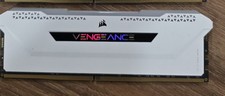
Corsair Vengeance RGB Pro SL DDR4 16GB 3200MHz 288-Pin DIMM
$80.00

Netac DDR4 32GB 16GB DDR4 3200MHz UDIMM C16 Desktop Internal Memory RAM Kit
$105.99

Corsair CMK32GX4M2B3000C15 Vengeance LPX DDR4 3000mhz Memory Kit - 32GB (2x16GB)
$164.95
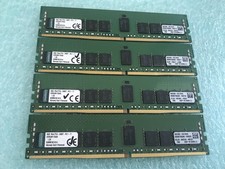
Kingston 32GB(4 x 8GB) KVR24R17S4/8 PC4-2400T ECC DDR4 Server RDIMM RAM - R1101A
$99.95

RAMAXEL Lenovo 32GB LPDDR5X CAMM2 7500MHz Laptop RAM | UNTESTED
$445.00

Corsair Vengeance DDR3 8GB 16GB 32GB 1866MHz PC3-14900 Desktop RAM Memory DIMM
$85.00
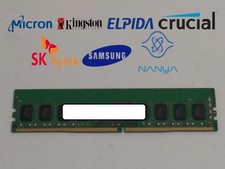
Major Brand 4 GB PC4-17000 (DDR4-2133) 1Rx8 DDR4 Desktop Memory
$12.99

Samsung 96GB LPCAMM2 PC5 9600 FE1 E1 LPDDR5X CAMM2 M561K6LC3CL1-CCV DDR5 Memory
$2150.00

Crucial 16GB (2x 8GB) Kit DDR3 1600MHz PC3-12800 UDIMM Desktop 240-Pin CL11 RAM
$41.00

Dell 16GB PC4-21300 (DDR4-2666) Memory (SNPPWR5TC16G)
$89.99