

 Reply With Quote
Try " kdf" in a rootshell.


Hi,
I installed knoppix 3.3 14-11-03 on a laptop a couple of days ago and I have a problem when I try to mount the cd device for, say, listen a music cd... I have a /cdrom, /dvd and a /cdaudio directory but when I try to mount it...
mount /dev/cdrom
mount: wrong fs type, bad option, bad superblock on /dev/cdrom,
or too many mounted file syste
and the same for /dev/dvd and idem for mount /dvd ... Do you have any idea of why??
Here you are my /etc/fstab :
# filesystem mountpoint type options dump pass
/dev/hda6 / ext3 defaults,errors=remount-ro 0 1
/dev/hda5 none swap sw 0 0
proc /proc proc defaults 0 0
/dev/fd0 /floppy vfat defaults,user,noauto,showexec,umask=022 0 0
/dev/cdrom /cdrom iso9660 defaults,ro,user,noexec,noauto 0 0
/dev/dvd /dvd iso9660 defaults,ro,user,noexec,noauto 0 0
/dev/cdaudio /cdaudio iso9660 defaults,ro,user,noexec,noauto 0 0
# Added by KNOPPIX
/dev/hda1 /mnt/hda1 ext3 noauto,users,exe
thanks!
Pau
Try " kdf" in a rootshell.
Hi... thanks, but I get the same:
mount -tiso9660 /dev/cdaudio /cdaudio -o defaults,ro,user,noexec,noauto
mount: wrong fs type, bad option, bad superblock on /dev/cdaudio,
or too many mounted file system
My problem is that when I launch a cd player program it cannot read it and remains "blank"...
A file cd is not a problem... I can mount it and read everything...
thanks again
Try XMMS and from the Main menu choose Play Location and enter /dev/cdrom and you should be able to listen to the disc. BTW you cannot mount an audio CD there is no "normal" file system on it.Originally Posted by pau
Do read/write permissions make a difference? (question).
Stu.....
nope... I tried everything and I am sure it's something trivial, but I can't figure out whaaaaaaaaaaaaat!?It's not such a big problem, of course... DVD is working, digital camera, printer... BUT I am not able to listen a music CD
Are you as user part of the audio group.
If not:
su root
adduser yourlogin audio
I had a similar problem and it turned out that /dev/cdrom a simlink to /dev/scd0 and I noticed from 'dmesg | less' that
hdd: attached ide-cdrom driver.
hdd: ATAPI 50X CD-ROM drive, 128kB Cache
so I change my /etc/fstab to:
#/dev/cdrom /cdrom iso9660 defaults,ro,user,noexec,noauto 0 0
/dev/hdd /cdrom iso9660 defaults,ro,user,noexec,noauto 0 0
and I was able to mount and access a data cdrom.
Thanks to everybody!
Markus gave me a good advice, because when I tried to do an "adduser userlogin audio", it gave me a lot of problems, because the default user "knoppix" was still there screwing everything up because I had erased that user... so I just had to edit /etc/group and substitute everywhere the word "knoppix" with my "userlogin" and that's all... restart x and now I am listening a wonderful CD and I feel happy because everything works... it was a real good idea to forget completely about windows... even though my wife complained a bit at the beginningBut now she's becoming an addict to the philosophy behind Linux TAG... don't forget that windows supported Bush with money...
cheers,
Pau
 Posting Permissions


(2) Seagate SAS Hard Drive Exos 7E8 3TB 7200RPM 128MB 12Gb/s 3.5 ST3000NM0035
$49.99

Dell EMC WD-HITACHI H5H72101CLAR10T0 10TB 7.2K SAS 12Gb/s SED 3.5in A POH 0-50k
$189.99

Seagate BarraCuda ST3000DM008 3TB Internal SATA 6Gb 3.5" Hard Drive 7200RPM 64MB
$91.99

Seagate 1YY207-004 SEAGATE EXOS 4TB SAS 6G 7.2K 25MM HDD
$45.00

Toshiba MG04ACA400 4TB 3.5-inch SATA 6 Gb/s 7,200 RPM Internal Hard Drive
$49.99
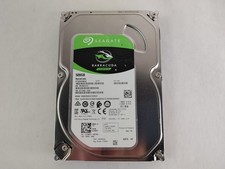
Seagate ST500DM009 BarraCuda 500 GB 3.5" SATA III Desktop Hard Drive
$14.99

Toshiba 14TB MG07 MG07ACA14TEY 7.2K RPM SATA 6Gb/s 512e 3.5" Enterprise HDD
$299.00

Seagate ST28000NM001C 28TB 256MB 7200RPM 3.5" SATA 6.0Gb/s Enterprise Hard Drive
$669.99

WD Ultrastar DC HC530 14TB SATA 6G 3.5" 7200RPM Enterprise HDD - WUH721414ALE604
$329.99

HDD 3.5" SATA Hard Drive with Windows 10/Win 11 64x Installed Legacy
$35.00