

 Reply With Quote
In your KDE control panel under Regional & Accessibility -> Keyboard Shortcuts
you can use the windows key in combinations, e.g. Win+z.
I'm not sure how to make it pop up the "start" menu like in windows..


Anyone know how I can get my useless windows key to work (like it does in Windows)?
In your KDE control panel under Regional & Accessibility -> Keyboard Shortcuts
you can use the windows key in combinations, e.g. Win+z.
I'm not sure how to make it pop up the "start" menu like in windows..
I use that exact shortcut combination to popup the menu, when opening the Keyboard shortcuts look for the Panel option then Popup Launch Menu and add a combination as the alternative to the already existing ALT + F1 that is there. You could try using it as a single key but I recall having problems with it not wanting to add a single key it wanted combinations.Originally Posted by eadz
Thanks for the replies...
Though I think I have tried it that way before (unsuccessfully) some time ago, I'll give it another go (tonight, when I get home).
 Posting Permissions


IBM System X3850-X5 Server w/4x Intel Xeon E7-4870 CPU , 512 GB DDR3 RAM,NO HDD
$1599.99

IBM 7915 AC1 M4 E27R704 Server Intel 2650V2 32GB RAM NO HDD w/ 2x 750w PSU
$225.00

Unused IBM 09P0037 MAINBOARD For RS/6000 7044-170 P-Series
$375.00

IBM QRadar xx29 2x Xeon E5-2650v4 2x 900W PSU M5120 12x 3.5" Bay Server No RAM
$179.99

IBM Power 8 S822L Server 8247-22L POWER8 Enterprise 256GB RAM 2x 00KV626 CPU
$999.99

IBM SYSTEM X3500 M3 SERVER 7380AC1 TOWER Server XEON E5620 8GB RAID SEE NOTES
$110.30

IBM System x3550 M3 1U Server 2x Xeon E5645, 192GB RAM, 2x 300GB HDD (7944-AC1)
$150.00
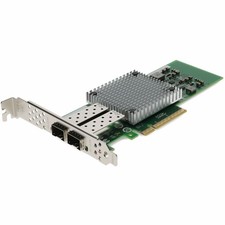
AddOn IBM 42C1800 Comparable 10Gbs Dual Open SFP+ Port Network Interface Card
$383.99

IBM ADP Server Type 7870 AC1 NO HDD | 128GB RAM PC3L | 2 x Xeon E5620
$199.99

IBM EMC 091-000-091 17 Inch Rackmount LCD Keyboard KVM Console 03N7012
$109.99