

 Reply With Quote
I use it for three things.
#1 My portable windows conversion kit.
#2 I use it on computers running windows when no linux box is available.
#3 If anything goes wrong on any of my boxes, I use it as a rescue disk


who uses knoppix for osmething else rather then just makeing the os look good

I use it for three things.
#1 My portable windows conversion kit.
#2 I use it on computers running windows when no linux box is available.
#3 If anything goes wrong on any of my boxes, I use it as a rescue disk
Hmmmm, an open ended question - ok...
I "will" be using Knoppix/Debian after I get my new computer and install the OS to my new hard drive - to do the following:
Go online, web surf, download new software, and security updates. Use the email, XMMS, CD ripping and burning features, and continue to frequent this newsgroup, and provide as much help to the others in this newsgroup as I can. I will be using this OS to create new wave files, edit existing wave files, burn CD Audio discs, and view the many DVD movies that I own already, plus any new ones I get. I will be using this OS to create new software for use in Linux installations, possibly even get up to the status of maybe being able to contribute back into the Linux community some of this programming ability, and to be included in future installations of the Linux OS. These things, and probably more that I can't think about at this moment.
As a side note: I am not, as you say, going to use this "thing" to make the OS look better. I am simply going to use Knoppix as the OS, and as many of its features that I can. I come from the ol' days in which you booted your "computer" by flipping toggle switches on a main board to enter your boot information - this OS beats that HANDS DOWN [giggle]
Cuddles
Wow! Are you speaking of the old GA-1830 or some similar beast? I too remember those days.I come from the ol' days in which you booted your "computer" by flipping toggle switches on a main board to enter your boot information
OMG Turbine, am I showing my "age" here, or what? [giggle]
I think it was a DG, Data General system. It was rack mounted into a seven foot high tower of a cabinet, had three rows of 16 "bit" switches that you threw to enter in your boot parameters on. It also had three CDC 300 Meg Disc Drums attached to it. Shesh, have we come a long way, or what? Sixteen platters about 1 foot in diameter, and all they accumulated to was, 300 Meg? WOW! Now ya can buy tiny little drives, that fit in your palm recorder, and have Gigabytes of storage on them.
Ahhhh, the good ol' days - the days when ya had a hard drive head crash, and one of those nasty GOUGED platters made someone a nice CLOCK. [LOL]
Take care Turbine,
Cuddles
Ours was a General Automation machine but it had the same 16 switches that you had to throw in the proper sequence (not 1 thru 16 of course) in order to boot the thing. One thing that those old machines had on their hard drives was what was called a "write lockout" switch. Throw it on and that hard drive could not be written to. Seems to me that if the drives of today had that then there would be no virus problem. Just put your OS on a smaller independent drive of it's own.
Nah, you ain't gettin older, you're getting better!
Better? I guess so, the whole age thing is getting to the point I can't recall things now. Ahhhhhh, what was that word again???? stuff.
Oh yeah, the old "hardware" protection locks -=- God forbid you put a user CDC disk into the machine and forget to set that thing to write. Yeeesh !
Good idea, SyQuest sells those hardware protection drives, last I heard they were pushing Gigabyte size. Zip drives are around 2 Gig, last I heard. But the SyQuest uses a hard disk platter, much better than the Zip using floppy disk matterial. IMHO. Hard part is getting a machine to boot one. But they would be excellent for a OS. A friend used to use a Hot-Swappable Tray to hold his hard drives. When he wanted another OS, he just dropped the system, removed the previous OS, popped in the one he wanted, and rebooted. Simple and easy.
I think with Knoppix and Linux, and all if its flavors, will challenge the whole concept of ease of use, and upgrading. Not to mention the whole "security" issues that plague M$ currently. As for the dual-boot issues, I think a lot of people converting from M$ are, sooner or later, going to be removing the M$ Windows, and going completely over into the Linux World. I am, and that was from just trying the Live CD of Knoppix. If it wasn't for the whole Winmodem issue on my current system, I'd never leave Knoppix to boot into Windows. I am only, still, using Windows to get email and Web Browse. [and in my opinion, it doesn't even do that right.]
Nice to hear from someone around my "day an age" still around, [giggle]
Cuddles
 Posting Permissions


Dell EMC PowerEdge R740 8 Bay Server w/ 32GB RAM 2x GOLD 6132 2x 1600W PSU H730p
$499.88

Dell EMC PowerEdge R440 Xeon silver 4215 2.5GHz 16 GB ram 2x 550W PSU No HDD
$275.00

Dell EMC VxRail E560F 10-SFF 2*Gold 6230R 2.1GHz No RAM HBA330 iDrac Ent Server
$349.99

Dell Poweredge R630 2x Xeon E5-2680 v3 2.5ghz 24-Cores / 64gb / Raid / 2x 1Tb
$374.99

Dell PowerEdge R730XD 28 Core Server 2X Xeon E5-2680 V4 H730 32GB RAM No HDD
$381.93
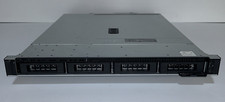
Dell PowerEdge R240 Intel Xeon E-2144G 3.6GHz 16GB DDR4 ECC NO HDD 250W
$149.00

Dell PowerEdge C4130 1U AI GPU Server | 2x E5-2680 v3 | 32gb Ram | 2x 1600W
$409.99

Dell Poweredge R730xd 12LFF 2*2660v4 4*1Gbe h730 2x 750W Server CTO
$308.00
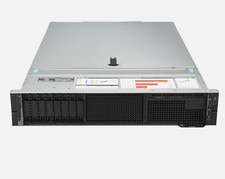
Dell PowerEdge R740 8B SFF CTO Barebone H330 QP 1GbE NDC 2x 750W PSU No CPU/Mem
$395.00

Dell Poweredge R630 2x Xeon E5-2680 v3 2.5ghz 24-Core | HBA330 | No RAM or HDD
$169.99