

 Reply With Quote
What exactly are you typing?


Yup, i even tried using insmod, same error.
What exactly are you typing?
#!/bin/bash
rmmod cs4232
rmmod ad1848
rmmod uart401
rmmod opl3
modprobe cs4232 io=0x530 irq=5 dma=1 dma2=0 mpuio=0x330 mpuirq=5 synthirq=-1 synthio=-1
modprobe opl3 io=0x388
thats saved as /etc/init.d/soundscript
with a symbolic link at /etc/rc5.d/s98soundscript
It works fine when I run it from the script from konsole, I dont understand whats going wrong.
One question and one point.
Firstly, did you make /etc/init.d/SoundScript executable?
Secondly, the symbolic link should be to called S98whatever, not s98.....
I think that the capitalisation does make a difference.
--
TimW
I changed the chmod and chown to match the other scripts, heres an output of ls -l:
-rwxr-xr-x 1 root root 1785 Nov 24 2001 smartsuite
-rwxr-xr-x 1 root root 179 May 8 21:47 soundscript
I renamed s98soundscript to S98soundscript, but that hasnt fixed it. Im pretty sure its executing because im gettin the errors when it boots up. I'll reboot now and try and jot them down.
This is the output from the soundscript (when called from rc5.d)
Code:rmmod: module cs4232 not loaded rmmod: module ad1848 not loaded rmmod: module uart401 not loaded ad1848/cs4232 codec driver Copyright ....... ad1848: No ISAPnP cards found, trying standard ones... cs4232: set synthio and synthirq to use wavefront facilities. YM3812 and OPL-3 driver Copyright ......
I fixed it. I commented out cs4232 and opl3 in /etc/modules, I may have added them while trying to fix the sound in the past. Im still gettin that error, but kmix (and the sound) are now working.
Thanks for the help
What those messages are saying (well, the first 3 at least) is that the rmmod part of the script isn't needed as modules haven't been loaded.
So you could comment that bit out of the script.
I think the other bits are output from the modules loading (not sure though).
Glad to see someone else went through all the conf.modules stuff unsuccessfully too. <g> I spent ages trying to get it to work in the correct fashion.
Ahh, I dont believe it, its messed up.
I had it working, but without changing anything (apart from apt-get upgrade and dist-upgrade), it now plays all sound/music about 1/4 the speed.
I think the upgrade updated kmix (it now has two tabs, input and output), but now it plays everything in 1/4 the speed (mp3s, music from games, etc). In noatun the playing time goes by slowly too.
Are you gettin the same problem? Im quite sure I didnt change anything with the soundscript, etc, since the problem started, only updating kmix.
I only bother using sound through xmms, and I use aumixer rather than kmix (try to avoid kde as much as possible).
However, everything seems fine here.
My last update of packages was Thursday night...
--
TimW
 Posting Permissions


Dell PowerEdge M630 Blade Server 2x Xeon E5-2680 v4, 2F3MP , 4GDP5 ,R10KJ ,JVFVR
$140.00

Dell PowerEdge M640 Blade Barebone Server Dell P/N: HHB006 Tested Working
$149.99

Cisco UCS 5108 Blade Server Chassis Enclosure N20-C6508 4x PSU 8x Fans 2x Fabric
$174.99
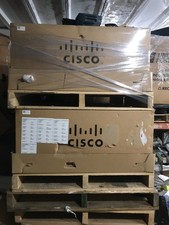
NEW Cisco UCSB-5108-AC2 Blade Server Chassis 8 Slot 6RU Chassis 4 X PSU - DW
$599.40
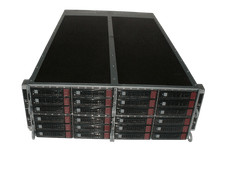
Supermicro 4U 32x 3.5 Bays 4-Nodes | 8x E5-2660 v3 2.6Ghz | 64gb RAM | 9207-8i
$699.99

NETAPP HCI NAF-1701 SuperMicro Server 4X BLADE H410C 8X GOLD 5120 4 NODE SERVER
$1499.97

Dell PowerEdge FX2 FX2s Server 10GbE CMC Blade Enclosure Chassis
$274.99

Dell PowerEdge FX2 FX2s Server 10GbE CMC Blade Empty Chassis XJ6VP
$149.99

Lot of 2 IBM blade center Type H chassis 8852
$559.00
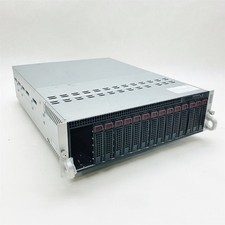
Supermicro 938-16 16-LFF MicroCloud SuperServer 5038ML-H8TRF *No Blade Servers*
$134.99