

 Reply With Quote
sorry, did I miss something
why would some one want to make a linux look like a winxp


Alright, I just blew up my 3.2-based remaster. I still don't really have time right now to commit to a project like this, but I'll get on it when I can. I extracted a 3.3 base and started moving over some of my usual customizations. Will start gutting some of the packages to make more space....
sorry, did I miss something
why would some one want to make a linux look like a winxp
Yes you did miss something, read back a few posts and all will become clear.
If you are a linux pro, no need to go on about how linux is better than windows. We have all heard it before. It isn't that impressive. Actually it is quite boring now. So read back and you will understand.
Wouldn't this be an easier sollution:
http://www.kde-look.org/content/show.php?content=1499

Actually no it wouldn't. What XPde is doing is creating the "full" environment with a run command, My computer, Network Neighborhood, with the "exact to the pixel" look and feel of Windows. It actually looks more like Win2k but will have the loona ? luna theme. So then freaks like me can move around and be at one with Linux under the hood and I can slowly learn about linux without the shock.
I don't want to have to continue arguing the whole Linux vs. Windows thing. I like Linux's philosophy, I like Windows' look and feel. I also like the software available for windows. I can do everything in widows and I never have a crash. Blue screens are for punks that don't know how to work Windows. I have yet to do anything productive with a Linux machine. What keeps me coming back is the philosophy and the hope that it will be more user friendly.
So, THAT's why you're called Hunkah!Originally Posted by Hunkah
Actually it is short for Hunkah Crap. It is my interNIC.
so someone (g1powermac) did it..
http://prdownloads.sourceforge.net/m...d.iso?download
Since this is first release there are still some issues with it:
01:44 < g1powermac> It will default to XPde version 0.4.2 but you can get xfce and xpde version 0.5 booted by typing "desktop=xfce" or "desktop=xpde5" as boot options
01:44 < g1powermac> Also, there is no root terminal "shortcut" yet in it (will be fixed since Gandalfar explained how to do it) so I have set it up like the minimod, where root password is "morphix"
01:45 < g1powermac> And, not all apps are in the start menu, just a selected few at this time
you can su into root, but you need to use "morphix" as a password
---
I just see this thread, and being a fan of overclockix I want to ask to Arkaine what happens with the project to include XPde with overclockix?
i have dun it for both XPde version 0.4 and 0.5
i found it remarkable easy and got the most recent in with few problems
it boots nicely from CD
if any1 has somewhere i can place the iso then it will be good as i have nowhere 2 host it
Its called DebXPde and it is still in development but i can put the versions iso up for both xpde V0.4 and V0.5
DebXPde Development Team
 Posting Permissions


Vintage 1998 iMac G3 M4984 Mac OS + Keyboard Working but Needs Some Repair Read
$295.00

VINTAGE Apple Mac OS X Computer Monitor
$250.00

Vintage Apple iMac G4 15" Lamp 700MHz 512MB Mac OS X 10.4.6 W/ Pro Speakers
$300.00

Vintage Apple PowerBook 15” G4 “Aluminum” (1.25GHz/2gb/150gb/Tiger) 2
$109.99

185--Sonnet Crescendo G3 PPCG3-375-5-K-06 G3 Add-On Card for Vintage Mac
$90.00

Apple Macintosh Plus 1MB M0001A Vintage Computer **TURNS ON **
$99.99
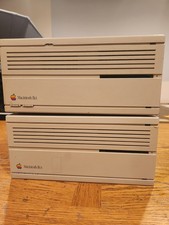
2X Vintage Apple Macintosh Desktop Computers - IIcx/IIci - Parts Repair Untested
$129.00
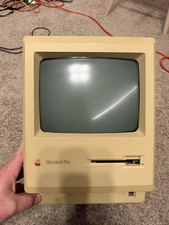
Apple Macintosh Plus 1MB M0001A Vintage Computer - Works
$169.99

Apple Power Macintosh PowerPC 7300/200 VTG w Keyboard Mouse Storage Drive Read
$199.99
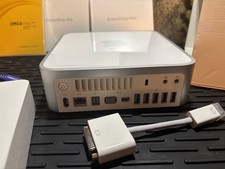
Vintage Apple Mac mini CIB (2009 Mod A1283) Original box/sealed manuals
$450.00
