

 Reply With Quote
Edit the file /etc/fstab and add this line:Originally Posted by spydie
For so stupid reason this is left out when knoppix is installed to the HD.Code:none /proc/bus/usb usbdevfs defaults 0 0


When I was running knoppix from the CD on my Dell 2300 I could plug in my Kodak DX6340 camera into the front USB and it worked great.
I was also running a USB mouse at the same time as the camera and they both worked fine.
Now that I have done a HD install I can not seem to get the camera to work.
My usb mouse still works fine, but it will not auto detect my camera like it did when I was running knoppix from the CD.
I went into setting, control center and manualy put the camera in, but it still will not work.
BTW: I can go to system, info center and try to view my usb devices and I just get a blank screen on the right half.
It use to show my USB devices fine when I was running knoppix from the CD.
I have done some searching and tried a couple of differant things, but just can't seem to get the camera to work.
What else could I try?
Thanks,
Edit the file /etc/fstab and add this line:
For so stupid reason this is left out when knoppix is installed to the HD.Code:none /proc/bus/usb usbdevfs defaults 0 0
I have never edited a file before, so could you please tell me step by step how I edit the file /etc/fstab and add that line to it?
Thanks,
Open a console window (clam shell icon on taskbar) the type in su then enter key type in root password enter key again. You are now root next type in gvim /etc/fstab to open the file for editing then hit the INSERT key to enter insert editing mode move to the bottom of the file and add the line hit the ESC key to exit the insert mode then save the file.
Well I must be getting close.
I put the line in, typed it just like this
none /proc/bus/usb usbdevfs defaults 0 0
I can see my usb items including the camera in system, info center.
When I go into control center I can also see the camera icon, but when I click on the test button I get,
error message
Unable to initialize camera. Check your port settings and camera connectivity and try again.
When I type camera:/ in the location bar on Konqueror it see's the camera as a file, but when I click on the camera file I get the error message,
Could not read file /
Did I maybe type in the line wrong?
Thanks
BTW: I rebooted after saving the new line, do I have to reboot after adding the line?
That's progress anyway. I have never setup one of these cameras but I know that they get accessed as scsi devices so boot from the CD and look at the boot messages with dmesg | less or dmesg | grep scsi should give you the information needed and check to see where the camera is detected then you need to duplicate the settings on your HD install. You will need to add a line into the /etc/fstab for the device and mount point if you post the dmesg with the camera being detected I may be able to figure out the correct line.
Hey! Me too. I was having exactly the same problem. and now I'm getting exactly the same results. Canon PS200 camera still gives 'Unable to initialize error' error when attempting to connect but at least now shows up in the info centre.
>>For some stupid reason this is left out when knoppix is installed to the HD.
There seems to be a fair amount of things 'left out' when Knoppix is installed to the HD. Like for instance 'automount' works for CD but not for floppies. but floppies WILL auto-mount if you attempt to open a file on a floppy from an application (ie Kwrite or some other app). And 'Halt' will not power down my desktop box. but it will power down the laptop.
I suppose to be fair it must be admitted that Knoppix was never intended to be used as a Debian installer instead of a run from CD distro but I'll bet that is what it gets used for most so the HD install maybe deserves get more attention.
Stephen, I don't know how you are managing to work the bugs out of it but this is about three times you have come up with solutions to problems that were driving me nuts. Thanks.
Spydie, you may find 'Kate' an easier to use file editor than gvim. You must be root to edit config files, you can start Kate the same way as above ie su-to-root then 'Kate /etc/fstab'. If you find you are using it a lot you can drag the 'Kate' item from the start menu to the desktop ('Copy here' not 'move here') then edit the properties to 'run as a different user'...'root'. Oddly, you may find that it will not let you edit the drag 'n' drop copy. The way around this is to open the desktop 'shortcut' in a text editor (Kate) as user then 'save as' a new name. You will then be able to edit the new 'shortcut' as user.
Any more help on this? Spydie, did you get your camera working?
Not yet, I'm still working on it.
I'm starting to run out of idea's
I booted from the cd to look at the /etc/fstab and compare it to /etc/fstab from when I boot to the HD.
I tried to add the camera like a usb card reader /dev/sda1
I should maybe add that I do not have a memory card in the camera, but I'm using the built in memory that the camera has.
This maybe why I can not use it as /dev/sda1 as I get some error message.
I can't remember just what the error message was now, but it's like when you don't have a floopy or cd in a drive and you try to use the drive.
The camera works great without a memory card install and using the built in memory of the camera when running knoppix from the cd so I don't see why I can't run the camera from the hard drive.
Anyway, I'm reading and learning. I will get it sooner for later.
I have learned a lot well trying to get the camera to work. That's what it's all about
Please feel free to let me know what I should try next.
Thanks for asking
Post the boot messages from both the knoppix boot with the camera working and then having changed nothing boot into the hd install and post them messages and then we can try to see the differences in how it gets detected. And the line you are trying to use in the /etc/fstab as well.
 Posting Permissions


Kingston 32GB 64GB 128GB 256GB USB 3.0 Flash Drive Thumb Memory Stick Pen lot
$285.90

Lot Of 8 Micron 8GB 2Rx8 PC4-2666V-RE2-11 ECC REG Server Ram MTA18ASF1G72PDZ-2G6
$210.00
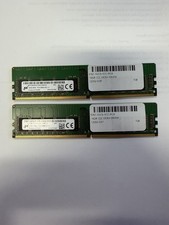
LOT OF 2 Micron 16GB 2Rx8 PC4-2666V-EE1-11 P/N: MTA18ASF2G72AZ-2G6D1ZG
$199.95
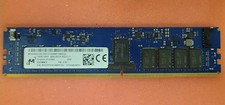
Micron MTA18ASF2G72XF1Z-2G9WP1ABVGD 16GB 1Rx4 NN4-2933Y DDR4 ECC NVDIMM
$74.50

USB 3.0 Flash Drive 32GB 64GB 128GB Memory Stick Thumb Stick Lot Pack
$826.09
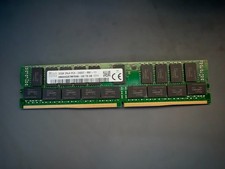
SK Hynix 32GB Server Memory 2Rx4 PC4-2400T-R81-11 HMA84GR7MFR4N-UH Server RAM
$169.99
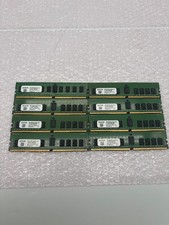
Lot of 8 A2ZEON 8GB DDR4-2133 RDIMM ECC 1Rx4 Server Memory RD4R8G44S2133
$529.99

USB 3.0 Micro SD SDHC TF Card Reader Memory Adapter for PC Laptop Camera lot
$3.75

LOT OF 4 Samsung 16GB DDR4-2666 ECC UDIMM 2Rx8 PC4-21300 M391A2K43BB1-CTDQ
$469.95

TF/SD Card Adapter Camera Reader Android Type-c For iPhone17 Pro Max Plusm lot
$573.98