
Gimp is there it's just not in the menu. Try Alt-F2, gimp or run if from the command line.Originally Posted by just Nick


Gimp is there it's just not in the menu. Try Alt-F2, gimp or run if from the command line.
Thanks, and Gimp is on there, just not in the menu. There was a problem with the kappfinder it seems.
And yeah, openoffice would be nice, but as it's a KDE promo thing, it needs Koffice on there, and there wasn't enough room for OO as well.
KnoppixKDE is great.
Here are some ideas for V2.
1. Put xvidtune in KDE menu (K->KNOPPIX->Configure->Monitor)
2. Put wheelmouse select in KDE menu (K->KNOPPIX->Configure->Mouse)
3. Games: L2Breakout, Frozen Bubble
4. Applications: Acrobat Reader, Opera Web Browser
5. ALSA sound drivers
I particularly agree with #5. I've tried using Rosegarden4 which is on the CD and I keep getting audio problems. They should be solved with the addition of ALSA and JACK. ALSA would probably also help out a lot of the sound card problems that we see in here on the forums. If I can get Rosegarden4 to work and to receive midi input from a keyboard/synth I will be in heaven. The one application I have to keep running windows for is Finale. I want to see how Rosegarden4 compares. Anyway, I hope that ALSA makes it in too.
A couple new cheat codes come to mind...
knoppix xquery [IP] *query an outside X-server rather than from CD
knoppix non-fb *no framebuffer startup (i know it's been mentioned)
knoppix iso=[iso location] *such as iso=/dev/hda1/temp/knoppix.iso
I know that last one is a bit obscure, but it would allow for burning just the isolinux stuff you've made and boot off an iso sitting on the hdd, speeding development.
It would also be great if kappfind or something of that sort works correctly in the chrooted environment. I'm personally having problems updating the menu system, and keeping changes such as kicker configurations while remastering, though i'm sure that that's due to my own ignorance.
As someone else noted, after knx-hdinstall netcardconfig is needed, that will need to be fixed.
On a side note about your project, do you think you could provide scripts, examples or a good howto on the splash stuff, I didn't quite "get it" from your brief howto in the original knoppixkde thread.
KnoppixKDE is great.
You should add the Java2 SDK <--- not the gtk version, its incomplete
isknoppix non-fb *no framebuffer startup (i know it's been mentioned)what you are looking for?Code:vga=0
I just started a thread in the forum about this, but please see:
http://lufs.sf.net
It is a kernel module that does basically the same thing as kio_fish, but on a system-wide level. You can use it to mount ssh, sftp, ftp and will soon include http and webDAV. This would allow easy access to home/work directories from within any application in Knoppix. I'm guessing you could even use this with persistent home allowing you to make your home dir a LUFS such as:
mount -t lufs none /mnt/home -o nosuid,fs=sshfs,host=MYdynamicIP.yi.org,username=m ali,fmode=444,dmode=555
That would be awesome.
So, to sum up: Please include LUFS in your new kernel for v2.
the lufs module would be *very* nice in knoppix. thanks for the linkage.
knoppix is good!
I want to use chiese(GB) input!
thanks
 Posting Permissions


GIGABYTE A520M DS3H AC AMD AM4 Motherboard mATX
$59.99

GIGABYTE Z790 AORUS ELITE AX LGA 1700 Intel Z790 ATX Motherboard with DDR5
$189.99

Intel H310 LGA1151 8-9th Gen DDR4 M.2 NVMe mATX Motherboard IO Shield Battery
$54.99
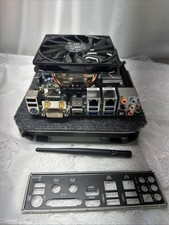
Gigabyte GA-Z87N-WIFI i7-4790K 16GB Mini-ITX Combo I/O Shield
$99.00

GIGABYTE B365 HD3 LGA1151 Intel 9th Gen motherboard
$59.99

Intel H81 Motherboard M.2 NVMe LGA 1150 mATX w/ IO Shield (Random Slot Color)
$29.90

ASUS PRIME B360M-C MicroATX Intel LGA1151 DDR4 HDMI VGA USB RJ-45 Audio
$34.99

ASUS PRIME Z370-A II LGA 1151 Intel Z370 DDR4 DIMM USB3.1 DVI ATX RGB
$69.99

ASUS PRIME Z490-V Motherboard Intel Z490 10th gen DDR4 LGA 1200 ATX w/ IO Shield
$84.99

Dell XPS 8940 Desktop Motherboard Intel H470 LGA1200 DDR4 K3CM7 KV3RP 427JK
$154.99

 Reply With Quote