

 Reply With Quote
Behind a router, everything will be automatic and the computers will not interfere with eachother. You don't have to configure anything. The only thing to worry about is whether or not knoppix has your network card driver installed.


Okay, I've tried figuring this out many many times, and I just don't understand.
What I want it to do:
-->Use Konquor (sp) and Mozilla
-->Use GAIM
-->Mess around with Shell
-->Use the hacking programs that my friend put on for me
What I dont understand:
-->How to configure my internet when I have a router (my setup: Modem>>router>>My Windows XP and a Windows 98 tower
>>My sister's Windows XP
>>My laptop, occasionally plugged in (Windows 95)
>>My mom's laptop, plugged in for work *very important* (Windows 2000))
-->Is there a command in Shell to configure my internet
-->How do I configure my internet back to my XP when I want to be on Windows again
-->Will Windows configure the net itself (the lady I called at our internet company (Access Communications) said she thought it would, but she wasn't sure)
-->Can I have the 98, other XP and both laptops on the internet while I have my XP configured to Knoppix
And if you could explain it in more simplistic terms I would be very grateful. It's not like I don't know about computers, I'm just new to Knoppix, and I don't want to have any risk of not understanding and messing up my internet connection.
Behind a router, everything will be automatic and the computers will not interfere with eachother. You don't have to configure anything. The only thing to worry about is whether or not knoppix has your network card driver installed.
Dude thank you so much.. one last question though.. how do I know what network card driver is installed?
You can see it in your windows XP, in the control panel. You can also see it in your system information, or diagnostics programs. It's easy. If you see it, you would be able to download a driver (if it exists).
Um.. maybe the right question then would be how do I know if the right one is installed on the copy of Knoppix that I have?
Try opening a console window (clam shell icon on the taskbar) and lsmod > lsmod.txt which will re-direct the output of the command to the file lsmod.txt and it will be in the directory /ramdisk/home/knoppix you should do this with lspci -v > lspci.txt as well. Now right click on the floppy icon on the desktop and choose Properties then go to the permissions tab and uncheck read only. Make sure to put a formatted floppy in and click on the icon when the window opens up go to the Window menu item along the top and select split view either left/right or up/down and then in the location bar type in /ramdisk/home/knoppix/ and then enter key and drag and drop the saved files to the other window which will still be the floppy wait a little bit while it writes to the disk you may have to close the window to make it clear the cache and post the contents of the files here so we can see if the card is detected and in use.Originally Posted by Romen
Okay um.. I'll do that first chance tomorrow, because I'll have to show my mom before I can do anything ><;;;;;
Just to make sure: Doing all that won't change any settings? (sorry, I'm paranoid, I know....)
Nothing at all you will be running the cd the files will just be copied to the ramdisk then you will copy them to the floppy and post them here. Is the machine you are going to try this on a Dell if so so of them have buggy BIOS's and when knoppix shuts down you sometimes have to unplug the power cable for a few seconds say 20-30 before it will boot back to windows.
Okay.. no my computer isn't a Dell.. and I got up to the part about the floppy discs.. and it's giving me a message:
file:/mnt/floppy does not exist
What happened?
That's a good question did it happen when you clicked on the icon or when you split the screen? If it happened when you split the screen to have the two windows it may be because it is trying to access the floppy and it is already in use just open the floppy drive by clicking on the icon and in Konqueror (that is the web browser that runs at start up) in the location bar type in /ramdisk/home/knoppix and then the enter key to go into file browser mode make the window small enough so you can see the floppy window and drag and drop the files. If the floppy gave you that error when you clicked on it to start up the window then right click on the desktop and choose Create New then from that menu create floppy device and in the device tab choose the line with /dev/fd0 in it and make sure it is not set read only then copy the files with either method I have given you. If both the graphic methods fail then back in the console window where you created the files sudo mount /dev/fd0 /floppy and then sudo cp *.txt /floppy should copy the files to the floppy.
 Posting Permissions


Dell PowerEdge R640 1U 8SFF Server Barebones 2x Gold 5120 64GB H330 2x 750w
$538.88

Dell PowerEdge R740xd Dual Intel Silver 4116 @2.1GHz 32GB HBA330 24Bay Server
$525.00

Dell EMC PowerEdge R440 Xeon silver 4215 2.5GHz 16 GB ram 2x 550W PSU No HDD
$275.00

Dell Intel X710-DA2 5N7Y5 Dual-Port 10GbE SFP+ PCIe 3.0 x8 Network Adapter
$27.50

Dell EMC PowerEdge R740 8 Bay Server w/ 32GB RAM 2x GOLD 6132 2x 1600W PSU H730p
$499.88

Dell Poweredge R630 2x Xeon E5-2680 v3 2.5ghz 24-Cores / 64gb / Raid / 2x 1Tb
$374.99

Dell PowerEdge R640 1U 8SFF Server Barebones 2x Gold 6150 64GB 2x 750w
$499.88

Dell PowerEdge C4130 1U AI GPU Server | 2x E5-2680 v3 | 32gb Ram | 2x 1600W
$484.99
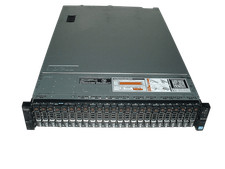
Dell Poweredge R720xd 2x Xeon E5-2660 2.2GHz 16-Cores 64gb H710 26x Trays
$364.99
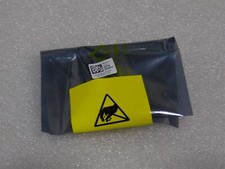
NEW DELL TRUSTED PLATFORM MODULE TPM 2.0 POWEREDGE R730 SERVER M48YR RXW6R K98XH
$225.00