

 Reply With Quote
I dont know if you talking to me but I tried that.fourtrackmind
Posted: Tue Feb 24, 2004 10:42 pm
If I just hit enter at the boot: prompt, it booted fine, my first times around the live CD.
Hope this helps


If I just hit enter at the boot: prompt, it booted fine, my first times around the live CD.
Did you try just typing "knoppix" (no quotes)?
Hope this helps
I dont know if you talking to me but I tried that.fourtrackmind
Posted: Tue Feb 24, 2004 10:42 pm
If I just hit enter at the boot: prompt, it booted fine, my first times around the live CD.
Hope this helps
Yes, I was talking to you!
I saved my preferences on a floppy and I need to boot as
knoppix floppyconfig
So, maybe just knoppix might work. Just enter worked my first few times, until I saved my preferences to a floppy.
I tried to help, anyway......
when you burned your disk A:what program did you use? b: did you goto something like "burn iso image"? and then burn the cd C: are the cd's your using 700mg?
A: I used Easy CD creatorpvalley
Posted: Wed Feb 25, 2004 2:01 am
when you burned your disk A:what program did you use? b: did you goto something like "burn iso image"? and then burn the cd C: are the cd's your using 700mg?
B: I just double clicked the ISO file. It automatically brought up Easy CD creator, then all I had to do is click "start recording".
C: Yes teh CD's are 700MB
Ok, the next step would be to verify the CD, type "knoppix testcd" at the boot prompt.Originally Posted by millennia
.Ok that didnt work eitther. It still hangs withwindos_no_thanksOk, the next step would be to verify the CD, type "knoppix testcd" at the boot prompt.
boot: testcd
Loading vmlinuz.............
Boot failed: please change disks and press a key to continue..
I'd say it is very likely you either have a faulty CD or hardware problems.
Check the md5sum of the iso file if you haven't done it already.
A windows checker program available here: http://etree.org/cgi-bin/counter.cgi...are/md5sum.exe
(get the *.iso.md5 file from the same place you got the iso file and compare the contents of it with the result the checker program gives)
If the md5sum doesn't match something has gone wrong during the download. Web browsers seem to have pretty crappy download features, some downloader software is recommended.
If the md5sum matches the burner software might be the cause of the problem, unfortunately many of them seem to be of poor quality...
well in all my time i hate to tell you this but you have a blown cd i would give it another go but before you do double check to see that you have the most recent directx installed and check to see if there are any patches to easy cd creator if all else fails get nero burning rom you can get vers 5.5 pretty cheap via the internet
Paul
Got mine to work...all it took was downloading alcohol 120% and burning the .iso with that.
 Posting Permissions


Intel 4th Gen Core i7-4790 SR1QF 3.60GHz (Turbo 4.00GHz) 8M 4-Core LGA-1150 CPU
$39.99
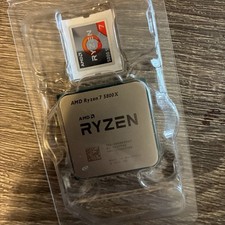
AMD Ryzen 7 5800X Desktop Processor (4.7GHz, 8 Cores, Socket AM4)
$169.99

Corsair RM750e 750W Fully Modular 80 Plus Gold ATX 3.1 PSU Certified Refurbished
$52.99

HP ProDesk 405 G8 Desktop AMD Ryzen 5 PRO 5650GE 16GB RAM 512GB SSD W11P
$260.49

Intel Core i7-7700T 2.9GHz 8MB Socket LGA1151 Quad Core Processor SR339
$39.99

Intel i7-8700 Coffee Lake 3.2GHz 6-Core Max Turbo 4.6GHz Processor
$69.99
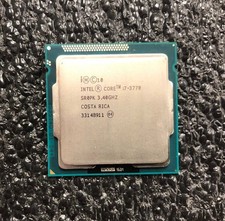
Intel i7-3770 Quad Core 3.40 Ghz Ivy Bridge Desktop Processor LGA 1155
$24.99
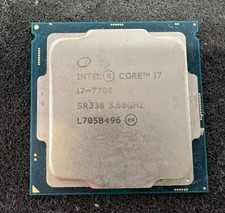
Intel 7th Gen Core i7-7700 3.6GHz 4 Core 8 Thread LGA1151 CPU SR338
$42.99

Intel 6th Gen Core i7-6700K 4.0GHz (Turbo 4.2GHz) 4-Core LGA1151 CPU SR2L0
$38.00

Intel Core i7-9700 3.0 GHz 8 Core Processor
$85.00
