


 Reply With Quote
These problems have already been solved many times over. You need to do a search on this site and in the FAQs for fstab for the mount problem and hdparm and DMA for the DVD skipping problem.Originally Posted by Silver_Seagull


Hello, my name is Silver_Seagull and I am a Linux noob.
OK, got Knoppix on its own partition (knx-hdinstall - ver 3.3 old) with a dual-boot LILO with Win XP home.
Got my GeForce 4 Ti4400 all drivered-up (nvidia drivers installed and working)
Can't get Knoppix (Debian technically I suppose) to recognize my optical drives. The drives are a DVD-ROM as master on the second IDE controller and a slave Yamaha CDR-F1 on the same cable. All the jumpers are in right etc...they work fine in Win-blows....I mean, Windows.
Now here's the curve-ball...I've dropped a DVD into the drive and have Ogle and Xine installed with libdvdcss 1.2.8....the DVD runs like shite (16x player..go figure) but that's for another thread. The thing is tho, it RUNS it. I can also start up K3B and have it recognize both drives and burn stuff to the Yamaha @ its top speed of 44x.
But I CANNOT, for the life of me, get it to mount the drives separately. You know, like as icons on the desktop...or even access them outside of the above mentioned programs.....
help would be much appreciated.
Cheers
These problems have already been solved many times over. You need to do a search on this site and in the FAQs for fstab for the mount problem and hdparm and DMA for the DVD skipping problem.
thanks for the reply....I did look and try the stuff on the site and it didn't seem to help....for some reason, I just booted and it seems to work....ty tho.
As for the DVD skipping problem....I have looked around and nothing seems to help....the hdparm -d1 /dev/cdrom OR /dev/dvd don't work because I get this:
And I am left sittingthere thinking WTF. It's an IDE cable, channel and Windows sees them as IDE as well (I checked to make sure I wasn't crazy)
Ideas?
What kernel are you using?
uname -r
Linux uses scsi emulation to access cdrom drives (no longer true w/ kernel 2.6.*). That's why they are seen as SCSI drives.
Try this:
cdrecord -scanbus
ls -al /dev/cdrom
/dev/cdrom should be a symlink pointing to your actual drive.
Try
hdparm -d /dev/scd0
(or wherever your drive is on the SCSI BUS).
ok, I tried what you said. My kernel is 2.4.24-xfs
this is what I get when I try the ls-al /dev/cdrom and then the hdparm thing
When I did the scanbus I got the following (I'm working as su for this)
All I want is for the DVD drive to be DMA-enabled...I'll admit I'm lost...what to do?
Try using /dev/hdc that should enable the dma on the actual device. Use as root hdparm /dev/hdc to see the settings before you change the setting to make sure it is not already enabled if this is the case then there is some other problem.
sounds like a plan stephen....
um, how do I do that? I got an error message from hdparm that looks like there's no device on hdc...but how do I do what you were saying about changing it to hdc? fstab? and if so, what do I change?
You do not have to change the /etc/fstab setting just use what is already there. You should make sure the link for the /dev/dvd points to the /dev/scd0. Can we see the output of the command here is what it looks like on my system.
If you need to set the dma you should make the changes in the file /etc/hdparm.conf with something like this.Code:>$ su Password: HappyTux:/home/stephen# hdparm /dev/hdc /dev/hdc: HDIO_GET_MULTCOUNT failed: Invalid argument IO_support = 1 (32-bit) unmaskirq = 1 (on) using_dma = 1 (on) keepsettings = 0 (off) readonly = 0 (off) readahead = 256 (on) HDIO_GETGEO failed: Invalid argument HappyTux:/home/stephen# hdparm -d1 /dev/hdc /dev/hdc: setting using_dma to 1 (on) using_dma = 1 (on) HappyTux:/home/stephen# hdparm -d1 /dev/cdrom /dev/cdrom: operation not supported on SCSI disks HappyTux:/home/stephen# hdparm -d1 /dev/dvd /dev/dvd: operation not supported on SCSI disks HappyTux:/home/stephen# cdrecord --scanbus Cdrecord-Clone 2.01a25 (i686-pc-linux-gnu) Copyright (C) 1995-2004 Jörg Schilling Linux sg driver version: 3.5.30 Using libscg version 'schily-0.8'. scsibus0: 0,0,0 0) 'HL-DT-ST' 'DVDRAM GSA-4040B' 'A104' Removable CD-ROM 0,1,0 1) * HappyTux:/home/stephen# cat /etc/fstab # /etc/fstab: static file system information. # # <file system> <mount point> <type> <options> <dump> <pass> /dev/scd0 /cdrom iso9660 ro,user,noauto 0 0 HappyTux:/home/stephen# ls -l /dev/dvd lrwxrwxrwx 1 root root 9 2004-03-06 23:41 /dev/dvd -> /dev/scd0
At the bottom of the file.Code:/dev/hdc { dma = on interrupt_unmask = on }
ok, I'm really really sorry, but I don't get what you mean stephen...I'm really that green
I tried following what you did in the example but nothing seemed to change (yes I rebooted) this is what it is set up as now.
I am honestly lost as to what I need to do. I'm really sorry to be eating up your time with my stupid questions..
That is ok, what does hdparm /dev/hdc and hdparm -d1 /dev/hdc say those are the important commands for me to see and you are root when you are doing the commands right? Oh and this is not windows you really do not have to reboot for many procedures you will get used to it after awhile especially when you install software.
 Posting Permissions

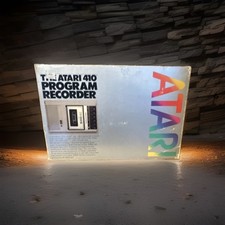
Atari 410 Program Recorder Cassette Tape Drive for Atari 400/800 Computers
$150.00

Atari 130 XE/Atari 1050 Bundle W/ Cords And Extras (Powered On)
$300.00

DEFECTIVE Atari 810 Vintage Computer Disk Drive powers on Unit Only Boo G3D
$49.29

Atari 800 8-bit Computer System Fully Tested Great Condition 48k READ
$350.00
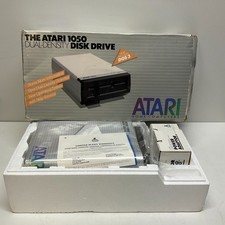
Atari 1050 Dual Density Floppy Disk Drive Brand New Never USED
$499.95

INFO/soft Character Generator Manual for Atari 3000/5000/7000 NTSC
$40.00

Fujinet 1.7.1 Atari 400 800 800XL 130XE 65XE XEGS Assembled, Tested, Working
$99.99

Atari XE 130XE Computer NTSC with Power Supply Powers On Untested
$159.95

UNOCART-2600 SD card Multi Rom Cartridge for ATARI 2600 with CASE
$34.25

Vintage Atari SF354 Floppy Disk Drive & Power Supply FOR PARTS OR REPAIR AS IS
$120.00