

 Reply With Quote
Untested, but try running pppconfig from the command line.


actually i can fix the problem by typing
'ifconfig eth0 down'
and that works great, otherwise, my internet tries using thethernet card... which is not hooked up. sad dialup for me... anyways, as i said it works fine but it get's annoying having to type it in everytime i boot up. i don't know anything about shell scripts or anything, but i can implement them.... is there a way to have one auto-load on boot, or maybe just tag on the command into my shortcut for kPPP (on my desktop)? any help much appreciated, i just spent like 7~8 hrs, installing on HDD repeatedly to get it right what with all the bootloader problems i had. thank u
Untested, but try running pppconfig from the command line.
will that be static so that everytime i login, it stays? if i do it from root is it inherited by all? or should i just rtfm? haha thanks
edit:
well i reinstalled to work out some other bugs i was having and just for the pure fun (if i say it, i just might believe it) anyways, for anyone's future reference... during the knx-hdinstall i deleted all the i.p. address entries that the script tried making ie: 'Nameserver Address' 'Local IP Address' so that everything is forced to take the dynamic addresses that my isp spits out.
one other question though... my floppy boot disk boots Knoppix fine, a little slow cause syslinux from floppy but works.... however after a clean install, when i put my linboot.img into my C: for WinXP bootloader to find and ammended entry to say 'C:\linboot.img=Knoppix Linux' when i choose that entry while loading i get:
L 01 01 01 01 01 01 01 01 01 ......
for about 8 or 9 rows. anyway to image my floppy and put it on C: to point bootloader to that? any other suggestions about how i can fix or what i'm doing wrong? thanks again, wow linux in 20 minutes + config like some sorta sys admin's wet dream
got everything solved... had assumed that bios scans ide for new harddrives, turned out no for me.... once i did that, i could find the written PBR on my second hard drive from lilo, after testing setup with floppy, wrote to /dev/hda MBR. Everything working flawlessly now :) On to the fun and updates!!!
 Posting Permissions


Dell Poweredge R730xd 12LFF 2*2660v4 4*1Gbe h730 2x 750W Server CTO
$308.00

Dell EMC PowerEdge R440 Xeon silver 4215 2.5GHz 16 GB ram 2x 550W PSU No HDD
$275.00

VMware vCenter Server 8 STANDARD Perpetual License Key VC-STD-C (Legacy Pack)
$1599.95

Dell Intel X710-DA2 5N7Y5 Dual-Port 10GbE SFP+ PCIe 3.0 x8 Network Adapter
$27.50
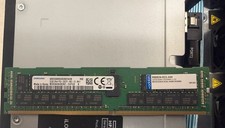
2x SAMSUNG 32GB DDR4 2RX4 PC4-2933Y SERVER MEMORY M393A4K40CB2-CVFC0 64GB TOTAL
$300.00

Gigabyte 4U AI Server 10x Nvidia GPU 2x Xeon Gold 6150 36 Core 2.7GHz DDR4 RAM
$1625.00

Dell PowerEdge C4130 1U AI GPU Server | 2x E5-2680 v3 | 32gb Ram | 2x 1600W
$409.99

Dell EMC PowerEdge R740 8 Bay Server w/ 32GB RAM 2x GOLD 6132 2x 1600W PSU H730p
$499.88

Dell Poweredge R630 2x Xeon E5-2680 v3 2.5ghz 24-Core | HBA330 | No RAM or HDD
$169.99

867959-B21 HPE ProLiant DL360 G10 CTO Server W/ 2x 865414-B21 1x 840140-001
$225.00