

 Reply With Quote
If you pressed ctl-alt-f1 to go to another login, and want to switch back, all you had to do was press ctl-alt-f7.


I'm really new: Just installed Knoppix on seperate hd (no lilo). I boot to Knoppix from diskette. From KDE I press C/A/F1 to go to the command line for practice. What command do I type to get back into KDE? I tried "root@tty[\]# KDM" to no avail. Also, several times I installed Lilo to boot into Linux from HDa1 (Windows), which messes around with the MBR, which I do not like. Is there some kind of batch file I can make with DOS to choose which OS I would like to use? Hopefully, in the near future I will be able to totally eliminate Windows from my computer.
If you pressed ctl-alt-f1 to go to another login, and want to switch back, all you had to do was press ctl-alt-f7.
Durand, I tried it, and it works. I have a lot of reading to do.
Thanks
Jesse
Hello:
I'm a relatively seasoned DOS/WinTel user but a brand new arrival to Linux thanks to Mr. Knopper, his dedicated crew and this fantastic linux distro. ;-D
Thank you, Klaus Knopper!
Just last night I was wondering about how to get around the same problem posted by Jesse. Went to shell with Ctrl+Alt+F1 but did not how to get back to the desktop. 8-/
Needless to say, I felt very frustrated as I looked all over but could not find the needed info.
eg:
How to list a directory content the same way I do it in DOS with the command c:\ dir /p ?
Or search all over a disk with c:\ dir *.abc /s ?
I am desperately needing a compendium of all the command line instructions the Linux shell will accept or a dictionary of DOS --> Linux commands so as to make my transition to Linux a bit less rispid.
Thanks in advance,
CIV
You can look at the sticky under General Support: http://www.knoppix.net/forum/viewtopic.php?t=2398
Here's some explanations:
http://linux-newbie.sunsite.dk/
http://www.desktop-linux.net/
"ls |less" , tap space for next page and quit by typing the letter q and use la instead if you want to see hidden files too.How to list a directory content the same way I do it in DOS with the command c:\ dir /p ?
You can search with find,whereis, locate.. ex: "locate .abc" , if you get tons of hits do "locate .abc|less"Or search all over a disk with c:\ dir *.abc /s ?
If locate says database is old do as root: "updatedb" and get a cup of coffee
i would greatly reccomend the floppix labs ( http://floppix.com/labs.html )
Floppix is a linux distribution on two floppies, intended to teach linux in comandline only mode. it is some 37 separate labs with questions and so, must be made by a teacher, it is a good way to start.
below i have listed a few linux=DOS equivalents.
dir /w = ls
dir = ls -l
add an a to list hidden files (ls -al). in linux anything named with a . first is a hidden file (.file).
copy file /new/file = cp /file /new/file
del =rm
add -r after (rm -r) and you will empty everything below that searchpath. add -f and you force the removal.
rm -rf / erases everything on compuer that you have read/write access to, as root that is EVERYTHING.
rmdir removes a directory (must be empty)
mv moves and/or renames a file mv /file /file2 renames the file. mv /file /new/file moves it to directory /new and finaly mv /file /new/file2 moves AND renames the file.
keep asking.
btw the man mv gives more, so does mv -h and mv --help and aporpos mv
to list available comands do ls on these directories,
/bin
/usr/bin
/usr/local/bin
/usr/X11R6/bin
now to list the comands available as root (root, the almighty superuser,aka 0.0 in linux/unix, more powerfull than any admin in windows)
/sbin
/usr/sbin
/usr/local/sbin
there are more but tese are confusing enough for now (as you see directories with bin in them are full of comands)
if the lists become too long you can pipe the output to less.
ls /usr/bin|less
to navigate use upp and down arows OR pageup/pagedown.
here to help
OE
hi jesse
concerning a dos-boot-menu:
i'm not an expert but may infos about loadlin does the job. the manual also gives an idea how to to set up a menu
http://elserv.ffm.fgan.de/~lermen/manual.txt
hope this helps, good luck.
andromeda
perhaps this might help some
http://www.linux.org/docs/ldp/howto/...nux-HOWTO.html
this is a fairly good howto on moving from win to linux.
http://www.linux.org/docs/ is a good resource.
so is http://www.tldp.org/
there is TONS of good facts on those sites.
Hello OErjan, andromeda, Markus:
Thank you very much for the replies.
I've been able to advance a bit on my own and these will surely help also.
Finally managed to configure the G400 Dual (!!!) and gotten around to setting up/customizing quite a few of the various aspects of Knoppix and KDE.
Coming from the DOS/Wintel camp, I see that I still have quite a lot to get used to ...
Best regards,
CIV
 Posting Permissions


Acer Aspire 14" AI Copilot+PC Laptop Core Ultra 5 226V Gen 4 ARC 16GB 1TB Refurb
$482.02

External SSD 1TB 2TB Portable Hard Drive USB 3.1 Type-C High Speed PC Mac
$16.99

1TB SanDisk Extreme Portable SSD (Recertified) - A196-SDSSDE61-1T00
$150.99

Dell Latitude 14" Laptop Computer Intel i5 Up To 32GB RAM 1TB SSD Windows 11 Pro
$339.98

Acer Predator Helios Neo 16S AI 16" i9 275HX 2S RTX 5070 Ti 32GB 1TB SSD Refurb
$1775.56
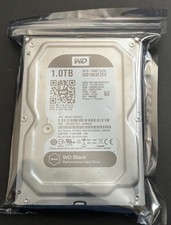
WD Black 1TB Performance Desktop Hard Disk Drive - 7200 RPM SATA 6 Gb/s 64MB Cac
$25.17

Fanxiang 1/2/5/10Pcs 2.5'' SATA SSD Lot 1TB 2TB 4TB 512GB 256GB TLC Internal SSD
$129.99

SAMSUNG T7 Portable SSD 1TB Indigo Blue USB 3.2 Gen2 External MU-PC1T0H/AM
$159.99

NEW 2026 SGIN 18.5" Laptop Windows 11 PRO Intel N5095 16GB DDR4 1024GB SSD
$444.99

Seagate Desktop 1TB/1000GB SATA 3.5" HDD Hard Drive
$29.99
