

 Reply With Quote
Can we see the output of apt-get -s install guarddog?Originally Posted by sn0wflake


How do I install Qt 3.0.2 so I can install Guarddog? I tried searching the Debian packages site but whatever I apt-get install doesn't work
Can we see the output of apt-get -s install guarddog?
Rebooting probably fixed the problem because Guarddog works now. It works too well because I can't connect to anything! I've tried Guarddog before with same result, then I tried Firestarter with positive results.
What am I doing wrong in Guarddog?
I'm connected to the Internet via. a switch and my IP is given by my ISP by DHCP.
In the manual page near the bottom I see an option in the Advanced tab to allow DHCP on an interface. So have you went to that option and selected it?
DHCP is enabled. Do I have to type in what ports I wish to use?
Well thats a good question and one I really do not know the answer too. If it does need you to open or forward the port I believe it is 67 or 68 that you need, I would try forwarding the port to the localhost first instead of opening it to everyone. And to be certain here it is the allow DHCP on interface not the allow server port that you have selected right? Now that I look at the screen shots again I see that it requires you to allow protocols from the internet to the local zone in the Protocol tab so you may want to check to see if the setting is in there somewhere.
Guarddog sucks in the mom+pop way. I have no desire to (VERY) manually configure my firewall.
I'll go back to Firestarter (http://firestarter.sourceforge.net). In that application all I have to do is block port 67 and 68 to get a perfect TruStealth score on http://grc.com.
I have no idea as to why people think Guarddog rules.
Firestarter is incidentally a native Gnome apllication. Maybe I should test Gnoppix
 Posting Permissions


Lenovo ThinkStation P520c Intel Xeon W-2133 6-Core 3.60GHz -NO RAM/ HDD/ GPU/ OS
$127.54
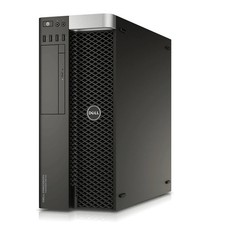
DELL PRECISION TOWER 5810 XEON E5-1620 v3 3.5GHz 4/8GB RAM Nvidia NO HDD/OS
$139.99

Intel Xeon Phi 5110P 60-Core 1.053GHz Coprocessor
$50.00

Dell EMC PowerEdge R440 Xeon silver 4215 2.5GHz 16 GB ram 2x 550W PSU No HDD
$275.00

Intel Xeon E5-2680 V2 2.8GHz 10-Core 25MB 8GT/s SR1A6 LGA2011 B Grade Server CPU
$7.95

Intel Xeon E5-2699 V4 2.20GHz 55M 22-CORES LGA2011-3 Server Processor 145W SR2JS
$84.49

Dell Precision T5820 Workstation 3.70GHz W-2135 No RAM/ GPU/ HDD/ OS
$179.98
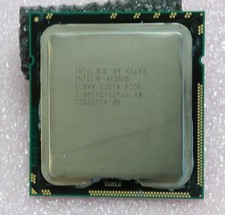
Intel Xeon X5690 3.46GHz 6.4GT/s 12MB 6-core 1333MHz SLBVX processor
$28.00
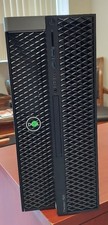
Dell Precision T7820 Dual Xeon 4214R 48GB RAM 512GB + 1TB Quadro P400 Win 11
$699.00

HP Z440 Workstation TWR Xeon E5-1603 v3, 8GB RAM, NVS310, SB1570, NO SSD/OS #95
$89.99