

 Reply With Quote
why don't you simply extract the mainmod?


Ok so far I've got Stallion booting with "Stallion/Firefox" going to my option of start page and rebooting the machine if you close it
Thelooks like this:Code:/copy/usr/bin/firefox.sh
the xterm is there for debugging when I need it.Code:#!/bin/bash /usr/bin/firefox www.mysite.com #xterm sudo /sbin/shutdown -nrf now
shutdown -r for a reeboot
Myabe I dont need these though:
-n (dont do init)
-f (dont fsck )
I need to get the keyboard in UK format and remove the spare terminals [ctrl alt fn] though.
I tried edditing /etc/X11/XF86config XkbLayout "gb" but so far still US,
As far understandingI agree, I'd rather know hats going.what is going on 'under the hood'.
One final thought re you cd eject.
Have you tried putting "eject" in as the last option in the init dirs?
This should then be the last thing it tries to run before shutdown.
Any help on the tty/kbd issue would me much appriciated..(Ghandalfar??)
why don't you simply extract the mainmod?
I couldn't get shutdown to work. The error I got indicated that shutdown couldn't communicate to the init command pipe. I have an idea that when init starts up it sets up its command pipe but then the file system is switched and the pipe is no longer connected to the 'active' file system. When you use the -n option you are bypassing all the init kill scripts. Halt with a link to reboot is working great. Since I already modified the firefox.sh script I feel pretty good putting all my mods there. I haven't had to change any other part of the distribution except adding a few packages and changing out mozilla-firefox for firefox. I did that so I could use an extension that would only install on firefox version 1.0 .
Mainly cos by changing things via the copy dir is easy to configure from any iso editor.Originally Posted by Ghandalfar
No need to extract and recompress files (which requires linux)
Although I have Linux machines and could extract&compress the mod files it is still quicker to tweak files in the copy dir.
I'm also trying to get this so that others can customise things (like the keyboard layout) with little or no knowlage.
Just WinIso & a text editor.
I use vmware and boot from the ISO file directly so it takes seconds to update files in the copy dir.
Also I still need to know which files to change
Gandalfar-
I always get a non-system disk error whenever I try to boot Stallion1.iso, Stallion2.iso, or VFF4.iso on my new Abit VF7 motherboard (other computers boot them fine though). Firefox3.iso and Firefox-1.iso (your old versions) boot just fine on this motherboard so it's not the motherboard (and I've tried a bunch of other LiveCDs too with no problem). I've made dozens of coasters, tried the lowest record speed (4X), different CD media, different CD recorders, and even swapped CD-ROMs but I still can't make the 3 newer iso's work (Stallion1.iso, Stallion2.iso, or VFF4.iso).
Others have also mentioned problems booting with the newer iso's when your first released Stallion1.iso.
Any idea what changed from Firefox3.iso to Stallion1.iso? It looks like you're using the same boot-loader for everything, yes? (I heard somewhere that going from syslinux to isolinux was causing similar problems with the DSL distro on some machines)
Thanks!
Dave
I have access to a range of machines some of which boot with stallion2 some wont.
If I can get the older Firefox ISO's Ill let you know if they work.
I've had a quick look on LiveCD but there's only the latest cd's from the front page.
Stallion works great for me, i really appreciate the work you put down on this project!!!
I have 2 questions tho:
Is there some easy way to make a HDD install of Stallion?
Is there some way to disable the question wether i wanto enable a swap file if the memory is less then 64mb?
Regards
Janne (Who is looking forward to the next release of Stallion like a kid on Christmas eve)
Found it (http://sourceforge.net/project/showf...group_id=71814)
Burned it
Worked on at least one of the machines that Stallion didnt so it looks like it is a change in the CD.
Ghandalfar, Was stallion1.iso created from Firefox-1.iso or was it from a diffrent base ISO?
HI have question...from reading your post many seem familiar with the remaster kiosk stuff...i have written a few post about how to do this. Well after reading much of the sutff here and in book "Knoppix Hacks" I have managed to remaster a Knoppix cd for a kiosk ...i need to set up in lobby at work for the field workers to use. They use it to check post by company. The kiosk is to only give them access to a specifc site set up on one of our servers. And they are not to be able to use any of the linux programs or be able to visit other sites.
I made a kiosk cd that boots imediatley into kiosk mode and opens the browser right away. It has all the setting I need and such. Works perfect.
Problem though the cd only works on that specific machine i used to create the CD. I need to make the same cd but it need to work in any of the other pc's.
After thinking about it and writing about this in post it was suggested i must be copying some setting from the creating pc to the kiosk cd. So that when i try to boot it from other computer it is using machine settings from creator pc instead of scanning new pc and using settings for that specific pc.
It was suggested to remove the XF86Config-4 file from source then remaster.
I did that and I checked file not there in remaster. Then burned cd and tested on few machines I get the same error message.
Error: No suitable X-server found for your card
Now in the book "Knoppix Hacks" it tells you on page 64 hack#21 if you are going to be using the cd in different computer to only save your "Personal Configurations" and not to save the graphics, network, desktop, printer ect.... settings. So that when inserted in new computer it will search for the settings it needs instead of assuming.
Ok so i try this one....and this time cd does boot, but
Anyone have idea what is happening ...I thought i ask here cus this post all about remstering and making kiosk sound like many of you have had success and no problem with cd being used in other computers...which means some of you must know the right way to do it.
Please any help appreciated.
I am pleased to announce that LiveCD team released special version of Stallion, called LiveInfo.
LiveInfo is fullscreen kiosk browser (no user navigation is provided from browser side), which main goal is to display information from html files, stored on the same CD-ROM, with or without user interaction. If user can interact with the computer and if only local files are provided for browsing, we can prevent user to escape out to the Internet. Even more - we can use also computer, which is actually not even connected to the Internet. However, there is always the possibility to allow people to browse also on the Web. However, user can be always limited to browse only among certain web pages without external links.
http://sigma.livecd.net/~skrat/LiveInfo-2.4.iso
Beside that lot's of effort was also put into user-friendly customization of some settings on our Live CD's. You can burn ISO image in multi session mode and add some of customization files into /usersettings/ directory on the CD. For more information, take a look into /usersettings/examples/ For example, you can change startup page, proxy, etc. with putting correct firefox prefs.js file directly into /usersettings/firefox/ directory or html files, which you want to display from LiveInfo into /usersettings/www/ (don't forget to change startup page in prefs.js or use index.html as first page you want to display).
That will also be very useful for Stallion users which want to change startup page, proxy settings, network settings etc. You can expect new verstion of Stallion to be released soon and will include all those features. Full features list for usersettings will be also published with new Stallion release.
 Posting Permissions


Netac DDR4 32GB 16GB DDR4 3200MHz UDIMM C16 Desktop Internal Memory RAM Kit
$99.99

A-Tech 8GB DDR3 1600 PC3-12800 Laptop SODIMM 204-Pin Memory RAM PC3L DDR3L 1x 8G
$21.68

RAMAXEL Lenovo 32GB LPDDR5X CAMM2 7500MHz Laptop RAM | UNTESTED
$445.00

Samsung 8GB DDR4 SO-DIMM PC4-3200AA 260-Pin RAM M471A1G44BB0-CWE Module
$29.25

Major Brand 16GB (2x8GB) PC3-12800U DDR3-1600MHz DDR3-12800 DESKTOP RAM NON-ECC
$29.99

DDR4 Laptop RAM 4GB 8GB 16GB 32GB 2400 2666 3200 Samsung Hynix
$30.00
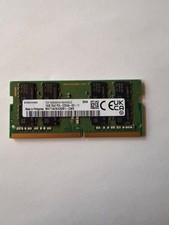
Samsung 16GB DDR4-3200 SO-DIMM 2Rx8 PC4-3200AA Laptop RAM M471A2K43DB1-CWE
$56.99

MINT Micron Cisco 32GB PC4-2400T DDR4 2Rx4 RDIMM RAM MTA36ASF4G72PZ-2G3 LOT
$159.99
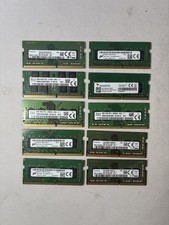
(Lot Of 10) 8GB DDR4 RAM 1Rx8 SODIMM Laptop Memory Mix Speed Mix Brand
$299.99
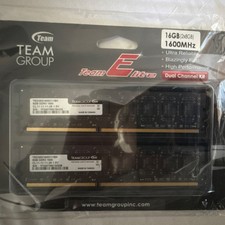
Team Group Team Elite DDR3-1600 DIMM 16GB (2x8GB) 240-Pin Desktop RAM
$35.00