

 Reply With Quote
Try this at console: chmod 0 /usr/bin/mkdesktophdicons


I'm using kurumin 4.0 alpha 2 (a Brazilian flavor of Knoppix) with Kde 3.3.
I like to have my icons (shortcuts to programs) in desktop arranged in a manner that I understand and I think make sense for me.
Every time I boot the system up, something sorts the icons in alphabetical order and arrange them in columns. I don't like that. It makes too difficult for me to find the icons.
Does anyone know how can I avoid the system to do this courtesy to me??
Try this at console: chmod 0 /usr/bin/mkdesktophdicons
 Posting Permissions


Lenovo ThinkStation P520c Intel Xeon W-2133 6-Core 3.60GHz -NO RAM/ HDD/ GPU/ OS
$127.54

Dell EMC PowerEdge R440 Xeon silver 4215 2.5GHz 16 GB ram 2x 550W PSU No HDD
$275.00

Intel Xeon Phi 5110P 60-Core 1.053GHz Coprocessor
$50.00

Dell Precision Tower 7810 Xeon E5-2630 v3 @ 2.40GHz , 32GB Ram, NO HDD, NO OS
$239.99

Dell Precision T5820 Workstation 3.70GHz W-2135 No RAM/ GPU/ HDD/ OS
$179.98

Intel Xeon E5-2699 V4 2.20GHz 55M 22-CORES LGA2011-3 Server Processor 145W SR2JS
$84.49

Intel Xeon E5-2690 v4 SR2N2 14 Core 2.6GHz 35MB LGA2011-3 CPU *km
$15.99

Intel Xeon E5-2680 V2 2.8GHz 10-Core 25MB 8GT/s SR1A6 LGA2011 B Grade Server CPU
$7.95
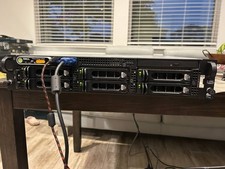
Dell PowerEdge 2950 EMS01 2U Server 6x 146GB 15K SAS PERC 5/i Dual PSU Xeon
$200.00

Dell Precision T1700 Workstation Intel Xeon 16G Ram 256GG SSD Nvidia 600 Win 10
$109.99