-
Moving files from Access Denied folder
I know there are a few solution threads around, i've tried most of them, very new to this so i'm asking for direct help, so sorry if it's kind of a re-post
I have a new pc with new HD and old HD put into it, i cant access the old "My Documents" from old HD because i get an access denied error, so i got the knoppix software to try n move the files out. BTW the old drive is partitioned, i'm hoping to move it into the other partitioned part.
I load up the knoppix software fine, i can browse all the files no access denied, but it wont send... i read up on going to the KNoppix>utitilities>captive ntfs but there is no "captive NTFS", i tried unchecking the "read only" in the drives, again still got denied when trying to copy files over, when i try to get access to modify folders it says i dont have the permission to do so... is there anything i can do?
I'm on Windows XP Home btw...
-
Administrator
Site Admin-
Re: Moving files from Access Denied folder

Originally Posted by
FabienO
but there is no "captive NTFS"....
captive NTFS has been removed; most people seem to be of the belief that this is because it just has never worked right and almost always corrupts the partition it attempts to write to. Try transfering your files some other way: Write them to a FAT partition on a USB flash drive, e-mail them to yourself, upload them to a site like yousendit.com, transfer them to another computer on a network, write them to floppy, write them to a CD or DVD (this last one needs to resolve the problem of how to do that when the Knoppix disc is in the drive and is in use, but there are a few ways to work around that).
-
Ok, well i need to transfer 15 gigs, so it's not small, how do i do that? I have an mp3 player which is 20gb's big can i use that at all or what can i do? a guide would be good please, thank you..
-
Senior Member
registered user
Re: Moving files from Access Denied folder
This may help, but you have to build it yourself:
http://www.ubcd4win.com/
--It uses Bart PE and actually boots into a windows-type environment, so NTFS is "native."
--If the destination drive is Fat32 or a native Linux filesystem (ext3,reiserfs, etc) you can copy stuff from the original NTFS partition by mounting it read-only; otherwise, NTFS has pretty much always been a problem because of MS closed design and general weirdness/complexity of the FS.
--As an alternative, if you haven't "committed" the destination drive to a partitioning scheme/windows install, you can repartition it with a 15+ Gig Ext2 partition, mke2fs, copy your files over, and use this utility to get at the files from Windoze:
http://www.fs-driver.org/
Originally Posted by
FabienO
I know there are a few solution threads around, i've tried most of them, very new to this so i'm asking for direct help, so sorry if it's kind of a re-post
I have a new pc with new HD and old HD put into it, i cant access the old "My Documents" from old HD because i get an access denied error, so i got the knoppix software to try n move the files out. BTW the old drive is partitioned, i'm hoping to move it into the other partitioned part.
I load up the knoppix software fine, i can browse all the files no access denied, but it wont send... i read up on going to the KNoppix>utitilities>captive ntfs but there is no "captive NTFS", i tried unchecking the "read only" in the drives, again still got denied when trying to copy files over, when i try to get access to modify folders it says i dont have the permission to do so... is there anything i can do?
I'm on Windows XP Home btw...
Similar Threads
-
By iced in forum Hardware & Booting
Replies: 1
Last Post: 09-10-2007, 08:56 AM
-
By dr_rude in forum General Support
Replies: 2
Last Post: 10-20-2004, 03:03 AM
-
By hellawaits in forum General Support
Replies: 1
Last Post: 03-14-2004, 02:28 AM
-
By tha_raptest in forum General Support
Replies: 0
Last Post: 02-12-2004, 08:05 PM
-
By oliver in forum Networking
Replies: 0
Last Post: 07-29-2003, 12:53 PM
 Posting Permissions
- You may not post new threads
- You may not post replies
- You may not post attachments
- You may not edit your posts
-
Forum Rules


Supermicro 2U X10DRU-i 2x E5-2680 v3 2.5ghz 32gb Ram 240gb SSD 2x GPU *READ*
$369.99

HP Proliant MicroServer Gen 8 2.23GHz Xeon 16GB RAM NO SSD
$249.99

Supermicro CSE-937 3U Storage Chassis No CPU No HDD No Ram Tested & Reset
$129.99

Supermicro 505-2 Server
$280.00

New Barebones Supermicro 5019D Server, 4C/8T Xeon D-2123T, 1U Rackmountable, 10G
$449.99
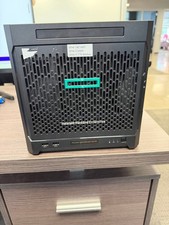
HPe Proliant Microserver Gen10 AMD Opteron 16GB RAM, 3x Intel SSD, Working
$600.00

SuperMicro 4U CSE 847 36 Bay LFF Barebone 2x 1280W w/ 2x Bays 2.5 Rear w/Trays
$499.99

Supermicro 5019D-4C-FN8TP Xeon D-2123IT (4C/8T) 64GB DDR4 10GbE 480GB 1U Server
$689.00

Nasuni NF-50 Supermicro Server, Atom CPU C2558, @ 2.40GHz, 8GB RAM-No HDD/OS/AC
$250.00

Supermicro E300-12C Mini 1U Barebone X12SCV-LVDS LGA1200 SNK-P0073A4 w/ Adapter
$225.00



 Reply With Quote