

 Reply With Quote
Any idea or help ?


When I use Knoppix V4 to edit file , I received this message :
You do not have enough permission to read file://mnt/hdb4/boot/grub/menu.lst
How can I get root previlidge to modify the file ?
Any idea or help ?
Two ways:
1.) First become root. use the command: su -
Then change the root password: passwd
Enter the new password twice, then exit: exit
now use KDEsu to run a editor as root: kdesu kate /mnt/hdb4/boot/grub/menu.lst
2.) Or use sudo: sudo kate /mnt/hdb4/boot/grub/menu.lst
Thanks for that ....I am going to try it and let you know.
Why can't I use :
gedit /boot/grub/menu.lst
Oh its also possible that the /mnt/hd4 is mounted read-only. So that too might prevent you from changing (writing) to a file.
That file is quite important & special to the system. It probably has permissions & owership to prevent non-priviledged users (non-root users) from making changes to it. Do a:Why can't I use: gedit /boot/grub/menu.lst
ls -l /boot/grub/menu.lst
and it will probably look something like:Code:-rw------- 1 root root 775 Aug 11 2004 menu.lst
knoppix@0[knoppix]$ su
root@0[knoppix]# passwd
Enter new UNIX password:
Retype new UNIX password:
passwd: password updated successfully
root@0[knoppix]#
root@0[knoppix]#
root@0[knoppix]# kdesu kate /mnt/hdb6/boot/grub/menu.lst
mkdir: Owner of /tmp/.ICE-unix should be set to root
DCOPClient::attachInternal. Attach failed Authentication Rejected, reason : None of the authentication protocols specified are supported and host-based authentication failed
ICE Connection rejected!
DCOPClient::attachInternal. Attach failed Authentication Rejected, reason : None of the authentication protocols specified are supported and host-based authentication failed
DCOPServer self-test failed.
kdeinit: DCOPServer could not be started, aborting.
kate: ERROR: KUniqueApplication: Can't setup DCOP communication.
root@0[knoppix]# ICE Connection rejected!
root@0[knoppix]#
root@0[knoppix]# sudo kate /mnt/hdb6/boot/grub/menu.lst
mkdir: Owner of /tmp/.ICE-unix should be set to root
DCOPClient::attachInternal. Attach failed Authentication Rejected, reason : None of the authentication protocols specified are supported and host-based authentication failed
ICE Connection rejected!
DCOPClient::attachInternal. Attach failed Authentication Rejected, reason : None of the authentication protocols specified are supported and host-based authentication failed
DCOPServer self-test failed.
kdeinit: DCOPServer could not be started, aborting.
kate: ERROR: KUniqueApplication: Can't setup DCOP communication.
root@0[knoppix]# ICE Connection rejected!
Then I found option called "root shell",,,I opened that one and I typed in:
vim /mnt/hdb6/boot/grub/menu.lst,,,,,,,,,,,,,,,,,,,,,,,it did work,,,
nedit /mnt/hdb6/boot/grub/menu.lst,,,,,,,,,,,,,,,,,,,,,,,it did work as well.
Yes I can read it,,,but today I realized that I can not modify it,,,,what should I do to overcome this issue ?vim /mnt/hdb6/boot/grub/menu.lst,,,,,,,,,,,,,,,,,,,,,,,it did work,,,
nedit /mnt/hdb6/boot/grub/menu.lst,,,,,,,,,,,,,,,,,,,,,,,it did work as well.
things to check:
do you have permissions to write it? Are you root user? And if you are not root user, then either become root user or use sudo.
Next, is /mnt/hdb6 mounted read only? If so, then even root user can not write to it? Remount it as writeable
Yes I am root user.Are you root user? And if you are not root user, then either become root user or use sudo.
Could you please explain ,what should I do to check and how can I mount it again?Next, is /mnt/hdb6 mounted read only? Remount it as writeable
 Posting Permissions


IBM System X3850-X5 Server w/4x Intel Xeon E7-4870 CPU , 512 GB DDR3 RAM,NO HDD
$1599.99

IBM QRadar xx29 2x Xeon E5-2650v4 2x 900W PSU M5120 12x 3.5" Bay Server No RAM
$179.99

DELL POWEREDGE HP IBM SERVER XEON GOLD 5315Y 8 CORE PROCESSOR 3.2 GHZ SRKXR
$1100.00

IBM ADP Server Type 7870 AC1 NO HDD | 128GB RAM PC3L | 2 x Xeon E5620
$199.99

IBM X3650 M5 5462-AC1,2 X E5-2640V3 2.6GHZ 8C, 16 GB, DUAL 750W, 2 X 1TB SERVER
$349.99

IBM SYSTEM X3500 M3 SERVER 7380AC1 TOWER Server XEON E5620 8GB RAID SEE NOTES
$111.70

IBM System x3550 M3 1U Server 2x Xeon E5645, 192GB RAM, 2x 300GB HDD (7944-AC1)
$150.00
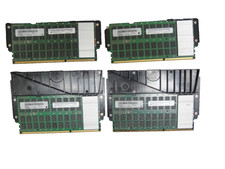
Lot of 4 IBM 00LP740 32GB DDR3 CDIMM Server DRAM MT80KLF4G72MDZ-1G6N1B50A
$109.95

IBM X3650 M4 Server System Board 00MX553 00AM209 00Y8499 00Y8457 00D2888 00W2671
$230.00

IBM System x3755 M3 2U Rackmount Server – No Drives or Trays
$150.00