

 Reply With Quote
Hi,
I think you have to change the read/write permission for that partition.
right click -> action -> change r/w permisison or something ..
cheers
Hardik


Hi,
I just have made Knoppix Live CD and tried it on my system.
Its works fine except this problem.
I can see all my Hard drive partitions, but I can not edit, make folder, copy any file here or there .
Also I tried connecting my USB Hdd , i can see all the files, but i can tranfer files in between,.
even can make new folder.
I'm very new to Linux etc .. kindly help me
regards
Hi,
I think you have to change the read/write permission for that partition.
right click -> action -> change r/w permisison or something ..
cheers
Hardik
Hi,
Thanx for the option. Yes I found that action button.
When I enabled write operation, I received a message:
Warning: The partition /dev /sal7 is of type NTFS ! Writing to this file system can cause data loss. You can try using the "Captive-ntfs" driver (see knoppix - utilites) or only do write manually and except to have to re-install the file system afterwords. This dialogue won't do this risky thing for you and will quit now without changing anything
I tried to find this captive ntfs but cdn't.
Hey friend, please do help me
Also in the drive properties, I checked all read write and execute for all. and un check the read-only.
Captive NTFS isn't there any more. It never worked right. Microsoft is going to great lengths to keep you from writing to NTFS with Linux and at this point and likely in the future NTFS is read only.
---
Verifying of md5 checksum and burning a CD at slow speed are important.
What Should I do now ??
I actually need to transfer data from my USB hdd, which I can only see in Linux Live CD.
It somhow disappeared in my portable devices menu in windows XP. I tried hard, checking the
drivers, Western digital help, but no use. Someone told me to copy all files somehow and then
format and re-setup the USB.
So far i can see the drive, but now I can't copy.
Need guidance from anyone who faced/fixed this problem earlier.
regards,
See Answer #5Originally Posted by Moody4U
---
Verifying of md5 checksum and burning a CD at slow speed are important.
A2: One of the best ways to recover your files is to plug in a USB drive of some sort.
When the desktop loads, you will see at least two hard drive icons on the desktop (one for your hard drive and one for the USB drive).
Click on the hard drive icons to open them up and figure out which drive is which.
Right-click the USB drive icon and choose "Actions > Change read/write mode" so you can write to the drive (it's read-only by default for security reasons).
Now find the files you want to back up and drag and drop them to the USB drive. When you are finished, shut down the system and remove the USB drive.
A5: If you don't have a USB device that you can use or another local system to transfer files to, you can send the files to an Internet site (although your Internet connection will be slower than a local transfer).
------------
A2 LITTLE close to my problem and not A5.
As My USB HDD have 34Gb data. I can't see this USB HDD in my windows Ummff.
Luckily I have Knoppix. I can see the drive, access files, do what ever I want with them .. but ONLY READ operations.
If you reverse A2 .. mean I want to backup my USB to my HDD .. how to do it
Thats actually I want, and am seeing no way how to do it.
Please I remember doing it once sometime back at my friends home using his PC (running some X-window ver of Linux)
Kindly Help me out
Q: How can I write data on NTFS partitions?
A: Under most conditions, Knoppix can not write or change files on an NTFS (http://www.wikipedia.org/wiki/NTFS) partition. Forcing it to do so may end up scrambling the underlying NTFS filesystem. Knoppix (and the Linux kernel) can read NTFS partitions just fine, the danger is only present when attempting to write to it. Older versions of Knoppix included a program called Captive NTFS (http://www.jankratochvil.net/project/captive/) that used the existing NTFS drivers from a Windows system to acesss the NTFS drive. Even then it was slow and unstable. Captive NTFS (http://www.jankratochvil.net/project/captive/) has not been maintained for over a year and is not currently included in recent Knoppix versions.
I dnt' want to switch the topic, but please help me for this USB HDD backup issue.
kind regards
The link that I gave you tells you how to find the wiki and Answer #5 points you to the Rescue faq in the wiki. My answer #2 is about hard disk installs (and the dangers of doing them), which is not what you are asking. The Rescue faq gives several techniques that people have used to recover data from a system, including cases where they have NTFS partitions that they can't write to. These range from external devices with FAT partitions to backups across a network and even adding an extra internal drive. I'm not going to retype the entire rescue faq here, and if I had moe information for you I would put it in the rescue faq where it belongs. The entire reason that I've been giving these links lately is that these same questions keep coming up but the answers are pretty well covered in the wiki.
I don't understand the problem. Knoppix simply can't write to NTFS (a gift that Microsoft seems to have put a lot of work into). If you wat to read from a USB and save those files, you need any of the following:
- A FAT partition on the hard disk that you can write to. Note that if you have files larger than (4 gig - 1 byte) on the USB device that they cannot be written to a FAT partition. Knoppix works fine for this.
A XP system that can both see the partitions on the USB device and write to it's own hard disk. This uses XP and not Knoppix.
A network that you can transfer the files across (local is better but the Internet may work depending on file size and your uplink speed). Knoppix works OK for this, although network transfers have their own issues (I use FTP to bypass Windows/Linux file sharing complexities).
Another device to save the files to, such as a CD or DVD burner. (Knoppix works fine for this approach).
I don't know what more I can tell you.
 Posting Permissions


Genuine Cisco SFP-10G-SR 0-2415-03 10 Gigabit Transceiver
$5.40

NEW Sealed Cisco SFP-10G-LR 10GBASE-LR SFP+ 1310nm 10km *US Shipping*
$24.00

Cisco Acacia DP04QSDD-E25-840 400G QSFP-DD Coherent DCO Transceiver Module
$699.99

Cisco WS-C3650-12X48UR-L 48-Port Stackable Layer 3 8x10G SFP+ Port Switch
$129.99

SFP TO RJ45 TRANSCEIVER SFP MODULE COPPER SFP OPTICAL PORT TO RJ45 ETHERNET PORT
$7.99

Intel X520-DA2 10Gb 10Gbe 10 Gigabit Network Adapter NIC Dual Port E10G42BTDA
$28.94
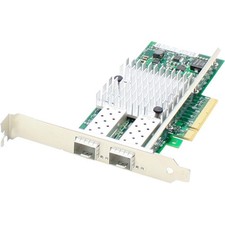
AddOn 10Gbs Dual Open SFP+ Port PCIe 2.0 x8 Network Interface Card w/PXE boot
$383.99

HP 560SFP+ 10GB 2-port PCIe NIC Ethernet ADAPTER 669279-001 w/ (2) 10GB SFP+
$16.99

Dell 10 Gigabit SFP+ SR Transceiver 0XYD50 NEW SEALED
$24.99

Arista SFP-10G-SR 10GBASE-SR XVR-10001-20 850nm SFP+ Optical Transceiver
$20.70
