

I am new to linux, and while I would like to think that I now coputers well, I obviously do not compared to everyone on this site.
When I try to use my d-link dwl-650 pcmcia wifi card in knoppix the computer doesn't recognize it (wifi manager program shows a little wireless card with a ? mark).
This seemed like it might be the problem, but I don't know, and even if I did I wouldn't know how to fix it.
When knoppix is loading I see some text that says:
pcmcia device detected starting cardmanager (this isn't exactly right)
[cardmanager]: starting version 3.2.5
[cardmanager]: unsupported card in socket 0
[cardmanager]: product info: "D-link", "DWL-650 wireless PC card RevP", "ISL37101P-10", "A3"
[cardmanager]: manfid: 0x000b, 0x7110 funtion: 6 (network)
Also in an unrelated (hopefully) issue, it then goes on to say that it found a firewire port, but I am pretty damn sure I don't have one, even though I wish I did. but then after that it says twice: "FATAL: could not read /lib/modules/2.6.11/kernal/drivers/input/evdev.ko: not directory"
Knoppix does eventually access a network device, but I'm assuming that it is accesing my ethernet port.
It says "network device eth0 detected DHCP broadcasting for IP." Disappointingly I don't have access to a hardwire ethernet connection.
I have done a bit of researching into problesm with d-link wireless pcmcia devices, and everyone I see that has a problem with them has problems with the "+" series, which mine is not. on the http://acx100.sourceforge.net/ website they explain that linux usually works with the non "+" series, but that the new 650 (with a grey antenna apparently) has a ti chipset and therefore encounters the same problems as the "+" series. I don't know if I have the new one or not. It's definitly grey (but so are 90% of computer products) but I don't see any antenna, at least not anything that looks like your average antenna. But then again, I've never seen a wireless laptop card with an antenna, so maybe i'm missing something.
Anyway, even if I find out that it is the new version of the card, can I download the same driver for my dwl-650 as a dwl-650+? my guess is not. Possibly this isn't even the problem, but if someone knows anything about this problem, has had a similar problem, or knows how to fix the problem, please let me know.
I am running a toshiba satellite A15-S129.
Your help would be greatly appreciated, and I promise to be thoroughly impressed with whatever you come up with.
 Posting Permissions


Supermicro 2U X10DRU-i 2x E5-2680 v3 2.5ghz 32gb Ram 240gb SSD 2x GPU *READ*
$369.99

HP Proliant MicroServer Gen 8 2.23GHz Xeon 16GB RAM NO SSD
$249.99

Supermicro CSE-937 3U Storage Chassis No CPU No HDD No Ram Tested & Reset
$129.99

$280.00

New Barebones Supermicro 5019D Server, 4C/8T Xeon D-2123T, 1U Rackmountable, 10G
$449.99
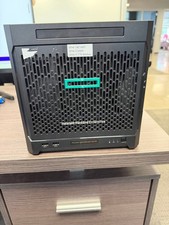
HPe Proliant Microserver Gen10 AMD Opteron 16GB RAM, 3x Intel SSD, Working
$600.00

SuperMicro 4U CSE 847 36 Bay LFF Barebone 2x 1280W w/ 2x Bays 2.5 Rear w/Trays
$499.99

Supermicro SuperServer E300-15 - SYS-e300-9C - 16GB RAM 240GB Samsung SSD
$239.00

Nasuni NF-50 Supermicro Server, Atom CPU C2558, @ 2.40GHz, 8GB RAM-No HDD/OS/AC
$250.00

Supermicro E300-12C Mini 1U Barebone X12SCV-LVDS LGA1200 SNK-P0073A4 w/ Adapter
$225.00


 Reply With Quote