

 Reply With Quote
And that it is what I what to know! I will try to mod auto-config when I return home after my job.
Cheers


Ah ok, in this case the 'script file' :P is '/etc/init.d/knoppix-autoconfig'.Originally Posted by kermitq
You have to look for a bunch of lines that starts with something like '# Starting creating /etc/fstab...' and comment_out/delete them or follow a less_invasive way already suggested by me here.
And that it is what I what to know! I will try to mod auto-config when I return home after my job.
Cheers
You may want to try mount -o remount,rw {device_name} {mount_point}
Here, {device_name} is the device name for your usb partition as it is booted into (may be /dev/sda1 ?), and {mount_point} is most likely "/cdrom", but I am not 100% sure.
If things don't work out, please post the listings from "mount" command and "cat /proc/mounts" when booted in.
Also, please describe how you get it to boot. Are you following the instructions here?
Please note that I am not a "guru", but know a couple of things here and there.
If you want to modify the system file itself so that it always boots RW, I think that the file to look at is "linuxrc" which is found inside the miniroot.
This is correct you are looking for approximately line 487 in linuxrc. If you change from this
to thisCode:mountit /dev/cloop /KNOPPIX "-o ro" || FOUND_KNOPPIX=""
you should be on the right track.Code:mountit /dev/cloop /KNOPPIX "-o rw" || FOUND_KNOPPIX=""
Actually, I doubt if that'd work. A cloop device is not writable, as of now. The device holding the KNOPPIX root file system image needs to be set "rw".
The problem is that, it isn't clear exactly how the poster is booting into the USB stick, and what filesystem is on the partition where KNOPPIX root fs is located by the booting process (namely initrd). He/she could also be using Rumbyeke's setup, for all you know.
Let me assume that his setup is as follows: the USB partition is formatted as some fs other than NTFS, and all the files found on knoppix CD (not just the compress root fs) are found in that partition's root folder.
Then, I think that the line to modify is line 467, from
toCode:if mountit $i /cdrom "-o ro" >/dev/null 2>&1; then
Strictly speaking, the script should be modified to adaptively or upon a boot prompt option permit mounting the boot media RW, because, this line would fail for non-RW devices like the cdrom.Code:if mountit $i /cdrom "-o rw" >/dev/null 2>&1; then
If the posted is still following, let him/her try and make this change and see if it works.
I will post a followup regarsless, as soon as I am able to do some testing on my own with the latest version of Knoppix (I had played with this on earlier versions).
thanks.
yes ... my bad, to be honest I didn't even look closely at the line, still waking up.
This would be the elegent solution
It shouldn't fail, mount is smart enough to recognise that the medium is in fact read only and act accordingly by notifying on stderr that it is mounting read only and even returning an successful code 0.
the results of linuxrc's customizations:
after changing one line to:
The system boots, but the usb stick is still read-only.Code:if mountit $i /cdrom "-o rw" >/dev/null 2>&1; then
After changing two lines lines, (following both tablet_guy and firnsy's posts)
system doesn't boot. Linux boots with error : 'Cant find KNOPPIX filesystem'Code:mountit /dev/cloop /KNOPPIX "-o rw" || FOUND_KNOPPIX="" ... if mountit $i /cdrom "-o rw" >/dev/null 2>&1; then
Cheers.
As tablet_guy mentioned, don't do my change as it isn't correct, I was supposed to post the line that tablet_guy mentioned.
For the reasons you have found out, the following will NOT work
What, if any, boot codes are you using in addition to the defaults?Code:mountit /dev/cloop /KNOPPIX "-o rw" || FOUND_KNOPPIX=""
I just start with 'knoppix'
But I also started only with changes presented by tablet_guy
It started but, dev/sda1 (the knoppix disk) was still read only.Code:if mountit $i /cdrom "-o rw" >/dev/null 2>&1; then
 Posting Permissions


New Barebones Supermicro 5019D Server, 4C/8T Xeon D-2123T, 1U Rackmountable, 10G
$449.99

HP Proliant MicroServer Gen 8 2.23GHz Xeon 16GB RAM NO SSD
$249.99

$280.00

Supermicro E300-12C Mini 1U Barebone X12SCV-LVDS LGA1200 SNK-P0073A4 w/ Adapter
$225.00
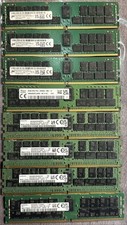
Micron 64GB 2Rx4 PC4-3200AA-RB2-14 3200MHz ECC Server RAM MTA36ASF8G72PZ-3G2F1TI
$4799.99

Supermicro 1027GR-TSF 1U Rackmount Server 2x Xeon 2.3GHz 128GB DDR3
$219.99

Supermicro SuperServer E300-15 - SYS-e300-9C - 16GB RAM 240GB Samsung SSD
$239.00

SuperMicro 4U CSE 847 36 Bay LFF Barebone 2x 1280W w/ 2x Bays 2.5 Rear w/Trays
$499.99

Supermicro CSE-937 3U Storage Chassis No CPU No HDD No Ram Tested & Reset
$129.99

Nasuni NF-50 Supermicro Server, Atom CPU C2558, @ 2.40GHz, 8GB RAM-No HDD/OS/AC
$250.00