-
Activate B43 WiFi on 6.4.3 BUG
Reference:
http://smtp.knoppix.net/wiki/Network...ppix_5.3.1_FAQ
I. Native way:
a)
Code:
knoppix@Microknoppix:~$ iwconfig
lo        no wireless extensions.

eth0      no wireless extensions.

knoppix@Microknoppix:~$
b) Need to put back b43 and ssb:
Code:
knoppix@Microknoppix:~$ sudo modprobe -a ssb
knoppix@Microknoppix:~$ sudo modprobe -a b43
knoppix@Microknoppix:~$ iwconfig
lo        no wireless extensions.

eth0      no wireless extensions.

wlan0     IEEE 802.11bg  ESSID:off/any
          Mode:Managed  Access Point: Not-Associated   Tx-Power=off
          Retry  long limit:7   RTS thr:off   Fragment thr:off
          Power Management:off

knoppix@Microknoppix:~$
c)
Code:
knoppix@Microknoppix:~$ ifconfig
eth0      Link encap:Ethernet  HWaddr 00:0f:b0:fa:e5:31
          inet addr:192.168.0.71  Bcast:192.168.0.255  Mask:255.255.255.0
          inet6 addr: fe80::20f:b0ff:fefa:e531/64 Scope:Link
          UP BROADCAST RUNNING MULTICAST  MTU:1500  Metric:1
          RX packets:3667 errors:0 dropped:0 overruns:0 frame:0
          TX packets:2071 errors:0 dropped:0 overruns:0 carrier:0
          collisions:0 txqueuelen:1000
          RX bytes:2442530 (2.3 MiB)  TX bytes:293863 (286.9 KiB)
          Interrupt:22 Base address:0xa000

lo        Link encap:Local Loopback
          inet addr:127.0.0.1  Mask:255.0.0.0
          inet6 addr: ::1/128 Scope:Host
          UP LOOPBACK RUNNING  MTU:16436  Metric:1
          RX packets:0 errors:0 dropped:0 overruns:0 frame:0
          TX packets:0 errors:0 dropped:0 overruns:0 carrier:0
          collisions:0 txqueuelen:0
          RX bytes:0 (0.0 B)  TX bytes:0 (0.0 B)

knoppix@Microknoppix:~$
* Only the "lo" entry there
d) Become the super user
Code:
knoppix@Microknoppix:~$ su
root@Microknoppix:/home/knoppix#
e) Setup the ESSID and the channel
Code:
root@Microknoppix:/home/knoppix# iwconfig wlan0 essid "my_network" channel "6"
root@Microknoppix:/home/knoppix#
f) Check the result
Code:
root@Microknoppix:/home/knoppix# iwconfig
lo        no wireless extensions.

eth0      no wireless extensions.

wlan0     IEEE 802.11bg  ESSID:"my_network"
          Mode:Managed  Frequency:2.437 GHz  Access Point: Not-Associated
          Tx-Power=off
          Retry  long limit:7   RTS thr:off   Fragment thr:off
          Encryption key:off
          Power Management:off

root@Microknoppix:/home/knoppix#
g) Activate the wlan0
Code:
root@Microknoppix:/home/knoppix# ifconfig wlan0 up
SIOCSIFFLAGS: Unknown error 132
root@Microknoppix:/home/knoppix#
* Error message returns
SIOCSIFFLAGS: Unknown error 132
** Native way has BUG?
Suspect Knoppix 5.3.1 DOCS are outdated.
Reply requested, please . . .
 Posting Permissions
- You may not post new threads
- You may not post replies
- You may not post attachments
- You may not edit your posts
-
Forum Rules


SFP TO RJ45 TRANSCEIVER SFP MODULE COPPER SFP OPTICAL PORT TO RJ45 ETHERNET PORT
$7.99

Cisco AIR-ACC15-SFP-GLD SFP Port Gland for AP1570 (Bag of 5 Units) NEW *SEALED*
$179.95
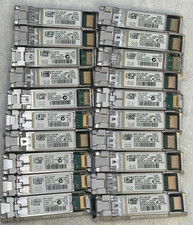
Lot of 20 Cisco SFP-10G-SR 10-2415-03 Transceiver Module
$50.00

NEW Sealed Cisco SFP-10G-LR 10GBASE-LR SFP+ 1310nm 10km *US Shipping*
$24.00

Cisco SFP-10G-SR Transceiver
$4.00

Cisco SFP-10G-SR-S SFP+ 10-3105-01 MMF Transceiver Module/Hologram.
$6.00

Intel X520-DA2 10Gb 10Gbe 10 Gigabit Network Adapter NIC Dual Port E10G42BTDA
$28.94

Cisco SFP-10G-LR 10Gb 40Km Long Range Transceiver Hologram in Clamshell * 1 unit
$45.00

For Cisco SFP-10G-T-X Module, 10G SFP to RJ-45 Copper, 10GBase-T, 1/2.5/5/10Gbps
$39.99

30PCS Sealed Cisco SFP-10G-SR 10GBASE-SR SFP+ Transceiver Module MMF 850nm 300m
$499.99



 Reply With Quote