

 Reply With Quote
Found a solution by creating a new partition and installing knoppix on the HDD.


Greetings. I'm trying to eject a Knoppix V7 DVD from the drive of a Dell Studio 1558. It lacks a manual eject and the Win7 install is busted (hence the knoppix DVD). I've got a USB drive with V6 on it, but when I try to boot from the USB, it starts, then switches to the DVD...meaning I can't eject the DVD.
Is there a boot setting that forces Knoppix to stay with the USB and not shift to the DVD?
For those thinking of other options, there's no BIOS setting to disable the optical drive and the only other way to get the disk out is by disassembling the laptop.
Thanks.
Found a solution by creating a new partition and installing knoppix on the HDD.
 Posting Permissions


Supermicro 2U X10DRU-i 2x E5-2680 v3 2.5ghz 32gb Ram 240gb SSD 2x GPU *READ*
$369.99

HP Proliant MicroServer Gen 8 2.23GHz Xeon 16GB RAM NO SSD
$249.99

$280.00

Supermicro E300-12C Mini 1U Barebone X12SCV-LVDS LGA1200 SNK-P0073A4 w/ Adapter
$225.00

New Barebones Supermicro 5019D Server, 4C/8T Xeon D-2123T, 1U Rackmountable, 10G
$449.99
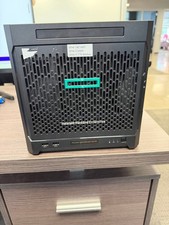
HPe Proliant Microserver Gen10 AMD Opteron 16GB RAM, 3x Intel SSD, Working
$600.00

SuperMicro 4U CSE 847 36 Bay LFF Barebone 2x 1280W w/ 2x Bays 2.5 Rear w/Trays
$499.99

1U Edge Firewall Server X11SCW-F Xeon E-2174G 0 RAM M.2 NVME 3x PCI-e 2x PSU X
$175.00

Supermicro CSE-937 3U Storage Chassis No CPU No HDD No Ram Tested & Reset
$129.99

Nasuni NF-50 Supermicro Server, Atom CPU C2558, @ 2.40GHz, 8GB RAM-No HDD/OS/AC
$250.00