
Hi i am just new and got my copy of knoppix can anyone tell me if there is any other software i can download for it i. e utilities etc and if so where
thank you


Hi i am just new and got my copy of knoppix can anyone tell me if there is any other software i can download for it i. e utilities etc and if so where
thank you
You mean there isn't enough on there
I think if you're running Knoppix from CD, that's about it. But do the HD install and you've basically got a Debian system. You can install any Debian package.
Is there a good place to get instructions for loading knoppix onto my HD? I'm currently booting off of the CD. I can't seem to print or save anything this way. I have a glitch when saving to floppy. Also, I can't use my speakers or camera. I have knoppix 3.2.
when booting CD, after it loads you open console and type "su" press enter then type "knx-hdinstall" and just follow the instructioons.
Good luck
Follow the instructions from the HdBased HowToOriginally Posted by stoneangel
stoneangel:
the short answer is to open a terminal and type "sudo /usr/local/bin/knx-hdinstall" -- even though it's an old article, here is a piece by Joe barr that still applies:
http://linuxtoday.com/infrastructure...10600226RVDBSW
Even though it's not supported (i.e. Klaus Knopper cannot guarantee you anything ;)), the hard-drive install script that starts when you issue that command has treated me well. I have always installed onto a dedicated hard drive (that is, not dual booting), can't offer any advice on dual booting.
One slightly tricky part of the install is partitioning, because the program used to do the partitioning (cfdisk) is not exactly intuitive. However, at least on my systems (installing onto a new, blank hard drive), it tends to offer sane defaults, so once cfdisk starts, I basically tap "w" (for 'write') and then "q" (for 'quit').
[Note that the Knoppix install script is multi-part; hitting "q" in cfdisk does *not* quit the installation process, just ends the disk partitioning part of it, and continues to the rest. Don't panic because you're hitting "quit" before you're through.]
If you're interested, though (see the man page ;)), you can use cfdisk to create a more elaborate partitioning scheme, for instance to put /home on its own partition etc, rather than slapping nearly everything onto a huge root partition.
timothy
 Posting Permissions


S-100 Vector Graphic 12K PROM/RAM Board (Altair, IMSAI)
$99.95

S-100 Vector Graphic 64K Ram Board (Altair, IMSAI)
$99.95

Vintage Digital Research ZSID 1.4 8" Floppy Disk CP/M Z80 Software S-100 Altair
$69.99
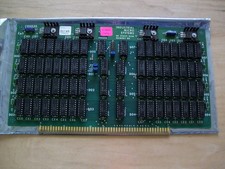
S-100 Industrial Micro Systems 8K Static Ram (IMS, Altair, IMSAI)
$69.95

Altair MITS S100 Backplane 8080A S-100 Replica IMSAI CP/M (bare board)
$40.00

BYTE Magazine Cover Jan 1977 Canvas Print 8"x10" Retro Computer Altair 880
$7.00
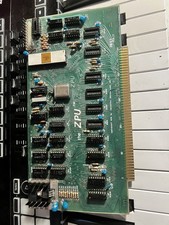
TDL “the ZPU” rev 1 February 1977 s100 cpu board
$345.00

S-100 backplane motherboard bare PCB 9 slot (for Altair/IMSAI)
$34.99

CP/M 86 1.1R 8086 Highmonitor 8 Inch Floppy Diskette 80s IMSAI Altair
$29.99

ALTAIR Bitcoin Mining Solutions PDU IEC SERIES 100-250V 30A/24A Power Distribute
$99.00

 Reply With Quote