

 Reply With Quote
i tried that one too. did not make any change.


If you have a Realtek 8139 card you need to use the cheatcode NOAPIC when booting off your live CD.
i tried that one too. did not make any change.
Have you read these threads:
http://www.knoppix.net/forum/viewtopic.php?t=2164
and
http://www.knoppix.net/forum/viewtopic.php?t=2117
and does it sound like your problem?
I've gotten wireless networking to work on my laptop without problems. It's a Inspiron 7000 400MHz with a Linksys WPC11 v. 3 pcmcia card.
First, I booted from Knoppix 3.3 disc with the nodhcp lang=en display=wmaker boot parameters. (I use static IP at home). The disc recognized the card and loaded the appropriate drivers.
Then, to set up the network I got to root then ran iwconfig. Enter the ssid ("cove_circle") and the network type. "Managed" (the default) is the same as "infrastructure" in Linksys's terminology. I didn't use WEP at first. All of the other parameters iwconfig asks for may be left blank.
Then enter:
Finally, edit /etc/resolv.conf to list your DNS nameservers.Code:ifconfig eth0 192.168.1.105 (use your computer's IP number on the network) ifconfig eth0 broadcast 192.168.1.255 netmask 255.255.255.0 route add -net default gw 192.168.1.1 netmask 0.0.0.0 metric 1
That's it. It just works.
Further adventures in getting a Linksys wireless card WPC11 to work under Knoppix on Dell Inspiron 7000:
When I boot from the Knoppix 3.3 dusc, the Linksys WPC11 is recognized without a problem. Once I did the hdinstall (using knx-install not knoppix-install), the wireless card would not be recognized. I don't know if an installation under knoppix-install would do better.
During boot, I goot the message "eth0: Error -110 reading firmware info. Wildly guessing capabilities..."
After a little searching, I found this site (http://www.hoffmannet.com/~thoffman/...0wireless.html) which pointed out a problem with the Inspiron laptops:
"Basically, it looks like there is a strange or old PCI-PCMCIA bridge in the I7000. I believe that this is leading to port conflicts when the wireless drivers are loading. I solved the above problems on both wireless cards by making the following changes to my config files:
edited my /etc/pcmcia/config.opts file and changed:
to:Code:include port 0x100-x4ff, port 0x00-0xcff
and for good measure I added below that line:Code:include port 0x300-x4ff, port 0x00-0xcff
Code:exclude port 0x100-0x2ff
Now, both the Cisco and the Lucent cards are working in both Linux"
I made those changes and now I'm on the network. Everything else appears to work at this point.
 Posting Permissions


HP ProLiant MicroServer Gen8 Tower Server Xeon E3-1220 v2 2.3GHz 16GB RAM
$289.99

Supermicro CSE-937 3U Storage Chassis No CPU No HDD No Ram Tested & Reset
$129.99

HP Proliant MicroServer Gen 8 2.23GHz Xeon 16GB RAM NO SSD
$249.99

Supermicro E300-12C Mini 1U Barebone X12SCV-LVDS LGA1200 SNK-P0073A4 w/ Adapter
$225.00

Supermicro 5019D-4C-FN8TP Xeon D-2123IT (4C/8T) 64GB DDR4 10GbE 480GB 1U Server
$649.00

New Barebones Supermicro 5019D Server, 4C/8T Xeon D-2123T, 1U Rackmountable, 10G
$449.99
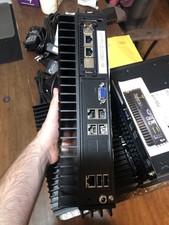
Supermicro SYS-E302-9A Fanless Firewall Atom C3558 16GB ECC 64GB SSD 6x GbE i350
$500.00

HPE ProLiant MicroServer Gen10 Plus 32GB RAM Xeon E-2224 3.40Ghz No HDD No AC
$750.00

POGO ATLAS 1102 Server 32 Gb RAM 4TB Storage 2x2TB HDD’s (Tested-Working) No OS
$179.85

Supermicro 938-16 16-LFF MicroCloud SuperServer 5038MR-H8TRF *No Blade Servers*
$159.99