

 Reply With Quote
Boot into Linux. Open a term and rerun lilo.
sudo /sbin/lilo
It should return something like:
Added Linux *
Added Windows *
If you see any errors then post your /etc/lilo.conf file.


Hi all,
i'm having a problem with lilo, can anyone help me?
I have windows and knoppix installed in my laptop, and when the laptop starts apeears to choise either knoppix or windows to start. If i choose knoppix i have no problems, but if i choose windows apears the following sentence : Lilo - Keytable read/checksum error
I've done a search in the forum but i didn't found the answer to my problem.
Thanks in advance.
Boot into Linux. Open a term and rerun lilo.
sudo /sbin/lilo
It should return something like:
Added Linux *
Added Windows *
If you see any errors then post your /etc/lilo.conf file.
In first place thks for your quick reply.
I did what you told me and appears the following > Warning : compact may conflict with LBA32 on some systems
Added Linux
Added Windows
This is my lilo.conf file :
lba32
# Generated by liloconfig
# Specifies the boot device
boot=/dev/hda3
# Specifies the device that should be mounted as root.
# If the special name CURRENT is used, the root device is set to the
# device on which the root file system is currently mounted. If the root
# has been changed with -r , the respective device is used. If the
# variable ROOT is omitted, the root device setting contained in the
# kernel image is used. It can be changed with the rdev program.
root=/dev/hda3
# Enables map compaction:
# Tries to merge read requests for adjacent sectors into a single
# read request. This drastically reduces load time and keeps the map
# smaller. Using COMPACT is especially recommended when booting from a
# floppy disk.
compact
# Install the specified file as the new boot sector.
# If INSTALL is omitted, /boot/boot.b is used as the default.
install=/boot/boot.b
# Specifies the number of _tenths_ of a second LILO should
# wait before booting the first image. LILO
# doesn't wait if DELAY is omitted or if DELAY is set to zero.
delay=20
# Specifies the location of the map file. If MAP is
# omitted, a file /boot/map is used.
map=/boot/map
# Specifies the VGA text mode that should be selected when
# booting. The following values are recognized (case is ignored):
# NORMAL select normal 80x25 text mode.
# EXTENDED select 80x50 text mode. The word EXTENDED can be
# abbreviated to EXT.
# ASK stop and ask for user input (at boot time).
# <number> use the corresponding text mode. A list of available modes
# can be obtained by booting with vga=ask and pressing [Enter].
vga=normal
image=/vmlinuz
label=Linux
read-only
# If you have another OS on this machine (say DOS),
# you can boot if by uncommenting the following lines
# (Of course, change /dev/hda2 to wherever your DOS partition is.)
other=/dev/hda1
label=Windows
Thks for the help.
Aha! You need to make a slight change to lilo.conf. Change
boot=/dev/hda3 to boot=/dev/hda
Of course don't forget to rerun lilo.
You see, when you had boot in hda3 lilo never even got started. Aparently you had another lilo install at one time. That should work.
Ok, the first error doesn't appear now, thks
But appear another one. When i select Windows to start in lilo, instead of running windows runs linux!!
It's very stange but when the laptop starts appears lilo ver.XXXX and the menu shows Linux or windows, whether i select win or linux appears again lilo ver.xxx and starts to run linux.
It seems that i have 2 lilo running !!
Thks again for your trouble!!
You do indeed have 2 lilo's. You are certain that your current Linux install is in /dev/hda3? It might be easiest to just reinstall your boot loaders. If you have a floppy drive you can boot a win98 floppy and do fdisk /mbr. Boot the machine- it should boot straight into windows. If so good. Use another floppy to boot Linux OR boot the Knoppix cd, mount your /root partition:
mount /dev/hda3 /mnt/hda3
Change root to your /root partition:
su
chroot /mnt/hda3
Then rerun lilo from there.
Hi again,
sorry fot the late reply...
Thks for all your help, it works
I did what you told and had no problems, thks again for you quick help!!
 Posting Permissions

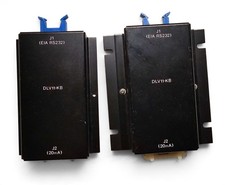
(2) Vintage DEC DLV11-KB RS-232 to 20mA Current Loop Converters PDP-11 As-Is
$170.00
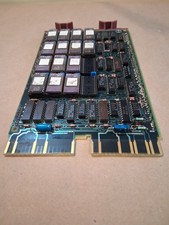
Vintage DEC Digital M8048 5013995C PDP-11 LSI 11 ROM (B3)
$149.99
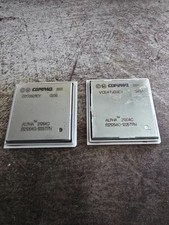
Lot of 2 Compaq Alpha 21264C B21264C-1225TPN Vintage DEC Alpha CPU 2001
$49.99

Vintage DEC/Mostek memory systems MK 8015 AA-00 6805-08015 1100 REV C(B7)
$279.99
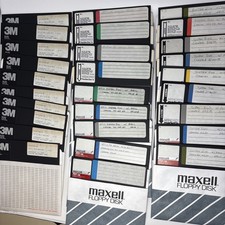
Vintage DEC RT-11 V5.0 8” Floppy Disks HT-11 System BASIC FORTRAN Software Lot
$199.95

Vintage DEC E2052-AA AlphaServer I/O Board 9 Gold Ceramic ICs 4.3 LB Gold Scrap
$599.99
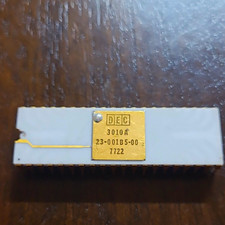
DEC 3010A Vintage Ceramic chip - ALL LEGS INTACT (BO)
$100.00
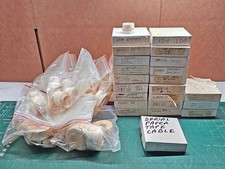
Vintage DEC LSI-11 PDP-11 Paper Tape Software Lot (96 Tapes) Cables Hardware
$649.00
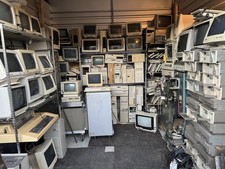
Vintage Computer Lot Commodore IBM Gateway AT Gaming Towers DEC IBM HUGE CRT LOT
$7250.00

Vintage DEC Digital Starion 200 Desktop PC Powers On Boots To BIOS NO HDD - DW
$269.99
