

 Reply With Quote
Where (or when) does this error occur exactly?


Hi everybody,
Knoppix Linux looks amazing on my desktop computer! I'm now interested to make it work on my IBM Thinkpad 1161-51f(series 2000) laptop.
Every time I try to boot from the Knoppix Linux CD I simply get a message saying "Boot Failed". Is there any way to know what specifically went wrong?
Anyone want more information about my laptop?
CPU: 600mhz celeron
RAM: 192 Mb
VIDEO: 4 Mb Silicon Motion LynxEM+ (2D)
HDD: 10GB IBM DJSA
CD-ROM: Toshiba DVD-ROM SD-C2402
I have read on the Internet that the integrated WinModem doesnt work with Linux. But technically, I don't care a single bit about the modem because I use wireless internet.
Can someone please help? I really want to be able to boot knoppix and do a HD install just like I did on my desktop!
Where (or when) does this error occur exactly?
Hi,
Thanks for trying to help me out...
This error occurs right away at booting. Before the Knoppix logo that gives all the booting options. Someone said that maybe the CD was corrupted, now I'm trying to burn another copy of Knoppix.
Ok. Hopefully that will work for you. Be sure to verify the md5sum of the ISO. If you know the ISO is good but think the disc is bad there are ways to check that too.
Ok, here's an update on my situation:
I'm seriously very unmotivated... I think I'll never get this thing to work. I veriffied the MD5 and burned the CD a second time. Still the same thing...
The Linux kernel is really advanced so why couldn't there be any "debug mode"? If that would be possible I could post my problem on Bugzilla. I don't really think it would help developers If I would simply post a lame message saying that I get a boot failure.
In fact, I don't even know why I'm using Knoppix. Maybe because I like Debian and debian is pretty complex to install and configure and Knoppix does that for me.
Anyone have some last ideas that could help me?
Do you actually hear the drive spinning before you get the boot failure message? Do you have any other bootable CD's you can try with to make sure it's not your laptop?
Another thing to do is try the cheatcodes. Maybe there is a problem with apic and using the noapic option would help.
Hi,
Heard the cdrom spinning, hell yea... I mean it's normal that it has to read some boot info right? Also, I ahve no problems booting using: Windows 98 boot cd, Windows XP Professional Installation CD, almost any linux distro setup disk...
I can't use cheatcodes because I get that error message even before theres that prompt to enter boot options.
Ok, have you tried the CD in another machine ?Originally Posted by paulius
Edit:
Hmm, I guess you have since you say you already did a HD install on your desktop...
I'm stumped
Well thanks for trying to help me anyways. I think I'm gonna have to simply use another distro. I think i'm gonna try installing Debian but I heard it's really painful and complicated.
Edit:
Also, yeah, I tried those 2 Knoppix cds that I burned on my desktop and server.
On my desktop it was smooth and I did a HD install (I'm actually typign this on my hd install).
On my server I got some problems when it tried to detect SCSI, I solved that problem by doing the expert mode and selected to simply not scan SCSI devices because technically I don't use SCSI.
On my laptop look above in the first post. I'm also thinking... Maybe even if I would be able to boot it successfully I think it would have problems with auto configuration of hardware because my BIOS doesn't have a "P&P OS" or "Initialize Hardware" option.
 Posting Permissions


Apple Computer cards VTG 670-8020-B 607-0103-C 607-0291-C AST -Orange Micro ++
$169.00

Vintage Apple iMac G4 15" Lamp 700MHz 512MB Mac OS X 10.4.6 W/ Pro Speakers
$300.00
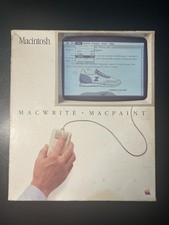
Vintage 1984 Apple Macintosh MacWrite & MacPaint Boxed Set - Near Complete
$125.00
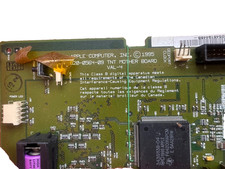
NEW Vintage Apple Computer (1995) TNT Mother Board ~ 820-0564-09 in Apple Carton
$285.00

Rare Vintage Macintosh Apple Wooden Disk Storage Box Dovetailed
$69.95
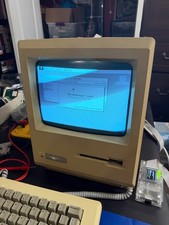
Vintage Apple Macintosh 512K Model M0001W - Works
$249.99
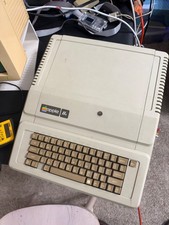
Apple IIe Vintage Computer A2S2064 Powers On Apple II Untested For Parts/repair
$149.99
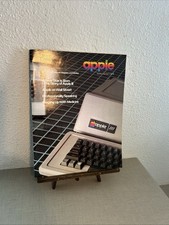
Vintage 1980 Apple Magazine Vol. 1 No. 4 With Retail Price List
$24.50

Vintage Apple Color RGB Color Monitor A2M6014. Used.
$199.99

Vintage Apple Multiple Scan 15av Display Monitor M4681
$299.99