

 Reply With Quote
You meant you're using ClusterKnoppix right? Ordinary Knoppix does not have a mosix kernel or packages it needs for clustering...


Hi!
I am a very new user of Knoppix Clustering. I have this project that is to connect at least 2 dell pentium 4 computers together to form a Linux cluster. I have already finished installing the knoppix on the Hd on my 2 computers with the info I get on the Internet.
What I want to do now is to prove that the cluster works. I have link it up to a private network that do allow me to surf the internet as well, although the mozilla do not work sometimes.
What kind of programs or scripts can i run to test the clustering? Where can I get these programs or scripts? How do I find out if the 2 computers are connected? There is an autodetect function which I read up in the installation guide but how will I know that they are connected in a cluster?
Thanks alot, will apperciate your fast responses.
You meant you're using ClusterKnoppix right? Ordinary Knoppix does not have a mosix kernel or packages it needs for clustering...
I am using KNOPPIX_V3.3-2003-11-19-EN.iso which I download it from "mirror.pacific.net.au".
Sorry but I am really new to Linux so I do not know how to go about at it.
But I have found a openMosix Stress test which I hope to use to test my clustering.(found on "www.openmosixview.com/omtest")
Please advise.
On this page- http://www.knoppix.net/docs/index.ph...Customizations
You will find many custom versions of Knoppix. One of them is called ClusterKnoppix which has been modified to act as a mosix cluster. Just network your PC's togher and boot them off of a CD and they should start communicating and swapping processes back and forth. The way a mosix cluster works is to balance the load of processes between all available machines and send them to the machines with the most free resources.
The way a beouwulf cluster works is to split the threads of multi-threaded applications and run them simultaneously on different machines. Only specially coded software will work this way- ie its not good for much from a home user's standpoint.
You are really good. Thanks alot, arkaine23.
I will try out the ClusterKnoppix as you suggested. Really apperciate your help.
When using a dual-processor ,does this work the same way ?
Or is the thread also divided into multi-threads and divided over both processors ?
SMP- multi threaded applications will take advantage of both CPU's. Otherwise single threads will distribute themsleves onto one or the other CPU. This makes SMP machines great at multi-tasking with single-threaded apps, and particularly (usually about 60% performance advantage) good at multi-threaded applications.
Hi again.
I have sucessfully download and burn the latest version of the clusterKNOPPIX_V3.3-2003-11-19-EN-cl1.iso.
I have no problems running it from the cd but when I tried a Hd Install, I get this error: "scandir:No such device or address".
I did the installation anyway and got some of the configurations wrong including the network as the error message keep popping out every 2-3 secs. After installing it, it is able to boot up but my network doesn't work anymore.
Tried to reinstall clusterKnoppix again but it pop out the error: "EXT2-fs error (device ide0(3,3)) ext2_write_inode: bad inode number: 5011 Remounting filesystem read only"
Another error: "shell-init: could not get current directory: getcwd: cannot access parent directoris: No such file or directory..."
What is wrong with my version? Can anything be done to get rid of the error?
really apperciate all the help there is..
Hi new~bie!
At me at the same problem >>>(scandir: No such device or address)!!!
If you have solved her, please send me the answer!
>>>[email protected]
Special Thanks!!!
There is a remaster that will allow paralell processing with normal programs.Originally Posted by arkaine23
I played with it but never really tested it.
 Posting Permissions


Supermicro 2U X10DRU-i 2x E5-2680 v3 2.5ghz 32gb Ram 240gb SSD 2x GPU *READ*
$369.99

HP Proliant MicroServer Gen 8 2.23GHz Xeon 16GB RAM NO SSD
$249.99

$280.00

Supermicro CSE-937 3U Storage Chassis No CPU No HDD No Ram Tested & Reset
$129.99

New Barebones Supermicro 5019D Server, 4C/8T Xeon D-2123T, 1U Rackmountable, 10G
$449.99
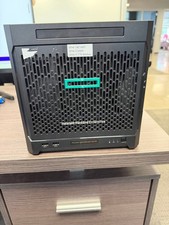
HPe Proliant Microserver Gen10 AMD Opteron 16GB RAM, 3x Intel SSD, Working
$600.00

SuperMicro 4U CSE 847 36 Bay LFF Barebone 2x 1280W w/ 2x Bays 2.5 Rear w/Trays
$499.99

Supermicro 5019D-4C-FN8TP Xeon D-2123IT (4C/8T) 64GB DDR4 10GbE 480GB 1U Server
$689.00

Supermicro E300-12C Mini 1U Barebone X12SCV-LVDS LGA1200 SNK-P0073A4 w/ Adapter
$225.00

Nasuni NF-50 Supermicro Server, Atom CPU C2558, @ 2.40GHz, 8GB RAM-No HDD/OS/AC
$250.00