

 Reply With Quote
First of all- you should really get a new Knoppix. It's currently at version 3.4 Secondly, did you try netcardconfig?
If that doesn't get you working tell us what NIC you have.


When I boot from the CD of Knoppix Live I have to type in "knoppix xmodule=nv". Im not quite sure what this is but I think it is something about my Nvidia Video card because when I dont type that before I boot it wont do anything when it trys to start up the GUI. Anyways back to the origianl problem.
When i boot up with the Knoppix Live 3.2 CD I dont get any network conenctions. I cant see the other computer I am networked to and I cant get the internet. I am connected to a Moterola Surfboard 4220 and a D-Link Dl-604 router.
If anyone could help me with my problem I would be very greatful. Thanks.
First of all- you should really get a new Knoppix. It's currently at version 3.4 Secondly, did you try netcardconfig?
If that doesn't get you working tell us what NIC you have.
Well I ran it and it told me that i failed...
It is a onboard LAN card. In device manager it tells me that it is a Realtek RTL8139/810x Family Fast Ethernet NIC. Hope this helps.
Knoppix 3.2 connects fine (as does 3.1), it might be nice to have a newer copy but it's not the issue. You might want to readOriginally Posted by Doomsday123
http://www.knoppix.net/forum/viewtopic.php?t=2164 and http://www.knoppix.net/forum/viewtopic.php?t=2117
You can try opening a shell and using the commands "sudo mii-tool -r" and then "netcardconfig".. You might also try the "noapic" cheat code on booting, or boot in expert mode and answering N to all questions (except whatever you need to do to get that nv driver loaded).
Ok I tried sudo mii-tool -r but it didnt work. But when I ran netcardconfig this time, instead of saying yes to DHCP broadcast i said no and used these settings.
IP eth0:192.168.0.1
Network Mask eth0:255.255.255.0
Broadcast Address eth0:192.168.0.255
Default Gateway:192.168.0.254
Nameserver:192.168.0.254
I am not sure what all of these settings are so if some of them are wrong tell me so I can change them.
After applying these changes, it acts like it is trying to go to google.com but it sits there for like a minute and then times out. Hope this info helps. Thanks.
I'm not sure what adress range D-Link defaults to (different routers use slightly different ranges). However, this is wrong. If your documentation tells you to connect to the D-Link at this address then this is the right address for the d-link, but it's not what you use here. You need to assign another address in the same range (192.168.0.1 is one of only 3 or 4 addresses in the range that you can't use, because the outer is using it). I like to start at an address like 192.168.0.100, but you could really pick any address in this range except 192.168.0.0, 192.168.0.1 or 192.168.0.255 and maybe 192.168.0.254
Yea, looks good
Yup, again right if the router is at 192.168.0.1
Nope, the gateway should be the router address: 192.168.0.1
Nope, what you need here is the address of a Domain Name Server, and I'm sure you don't have one locally at this address. Your ISP should have provided you with a DNS address. I could have sworn I could check what this setting was under Windows, but I just looked to try to find it and can't locate any place to find it (it's not in the control panel ethernet settings or in ipconfig), so I'm at a loss to tell you where to set this to unless you can get a good value from your ISP. It will not be a 192.168.xxx.xxx adress, it will likely be an IP address in your IPS assigned address range.
So would the Nameserver be my IP address or a diff number?
It certainly would be a different number. It's also called a DNS or Domain Name Server. Find out what your ISP recommends using as a DNS server.
Some routers also let you put their local IP address in as a DNS server (they simply see the DNS request and forward it to the right DNS server, which they determine by DHCP when they connect to your ISP). So you might be able to use 192.168.0.1, but I don't know for certain if your router works like this or not. You might also look at your router setup and see if it shows what DNS setting it is getting by DHCP when it connects to your ISP and use that.
Let me add something else here. While getting a good DNS setting (either by DHCP or by manually making the settings in netcardconfig) is important to be able to use URL's on the internet, it's not needed to determine if the network card is working. If you get the other settings right (for example, use 192.168.0.100 rather than 192.168.0.1 for your local IP address), then you should be able to ping the router (or actually any IP address on the internet) without ever using the Domain Name Server. (The Domain Name Server is only used to look up a URL, and is avoided if you supply a numeric IP address.) So put whatever you want in the nameserver setting and then try to ping 192.168.0.1. If you don't get a sucessful ping then you still have a network card issue with Knoppix, and getting a good DNS setting isn't going to help. It's very likely that you do still have a problem, and than once you can resolve this problem then the card will be able to do a netcardconfig using DHCP and the DNS setting will not be an issue at all (it will be set properly automatically).
 Posting Permissions


S-100 Vector Graphic 12K PROM/RAM Board (Altair, IMSAI)
$99.95

S-100 Vector Graphic 64K Ram Board (Altair, IMSAI)
$99.95

Vintage Digital Research ZSID 1.4 8" Floppy Disk CP/M Z80 Software S-100 Altair
$69.99
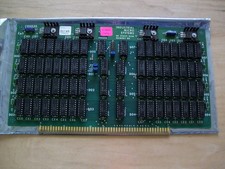
S-100 Industrial Micro Systems 8K Static Ram (IMS, Altair, IMSAI)
$69.95

Altair MITS S100 Backplane 8080A S-100 Replica IMSAI CP/M (bare board)
$40.00

BYTE Magazine Cover Jan 1977 Canvas Print 8"x10" Retro Computer Altair 880
$7.00
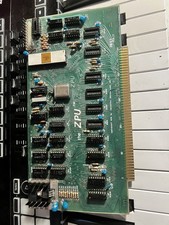
TDL “the ZPU” rev 1 February 1977 s100 cpu board
$345.00

S-100 backplane motherboard bare PCB 9 slot (for Altair/IMSAI)
$34.99

CP/M 86 1.1R 8086 Highmonitor 8 Inch Floppy Diskette 80s IMSAI Altair
$29.99

ALTAIR Bitcoin Mining Solutions PDU IEC SERIES 100-250V 30A/24A Power Distribute
$99.00