


 Reply With Quote
It's the seashell icon on the taskbar


Again I am sorry if these are stupid questions, but I am a newbie and still learning
I am reading this article:
http://www.knoppix.net/forum/viewtopic.php?t=4174,
In this article it says:
How do I call this up? Where do i find the terminal?(4) Start a Terminal session.
It's the seashell icon on the taskbar
On the taskbar in KDE it would be the monitor icon with a shell on it. Click on the icon and the terminal or also called console window will open up then you can type in the commands you need to.Originally Posted by ClubMed
 Posting Permissions


2-Bay/4-Bay Hard Drive Enclosure for 3.5"/2.5'' SATA HDD/SSD 10Gbps USB-C 3.2
$75.99

Areca ARC-1882IX-24 (16i4e)24-Port RAID Controller Card w/BBU /HDD Monitor Board
$300.00

CalDigit VR minin 2 Portable Raid Storage On The Go
$75.00

OWC Mercury Elite Pro 2 Bay RAID Enclosure with USB 3.2 for Dual 3.5 inch HDDs
$87.99
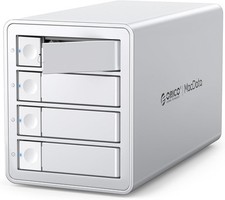
ORICO 4 Bay RAID Drive Enclosure - Upgraded JMS591 Chip - USB 3.2 Gen2x2 20Gbps
$279.99

WAVLINK RAID 2 Bay Hard Drive Docking Station SATA 2.5/3.5'' SSD HDD Enclosure
$119.99

Dell PowerEdge HBA330 LP PCI-E 12GBs RAID SAS Controller Adapter J7TNV
$18.95

Acasis USB 3.2 2 Bay HDD RAID Enclosure for 2.5/3.5" SATA Drives External Array
$55.00

Broadcom 9600-24i Tri-Mode RAID Controller 4.0 NVMe SAS SATA NEW 05-50111-01003
$639.69

Adaptec ASR-71605 16-Port 1Gbps PCIe RAID Card High Profile
$18.49