
I have a hd install of 3.4 and had an install of the remaster too. Both times mplayer doesnt launch, i tried the one with kmplayer via klik's site, and the rpms on the official site, both wont launch. Anyone know what is wrong?


I have a hd install of 3.4 and had an install of the remaster too. Both times mplayer doesnt launch, i tried the one with kmplayer via klik's site, and the rpms on the official site, both wont launch. Anyone know what is wrong?
According to the package list it is not installed so add this to your /etc/apt/sources.list and install it. Oh you want .deb packages when looking for applications .rpm are for Redhat, Mandrake ...Originally Posted by ZeroKun
You will want to install either the mplayer-[386,586,k6,k7] package depending on your machine the -386 is the safe default that will work with any computer. You will want the mplayer-fonts and the w32codecs packages as well.Code:## Various Multimedia Helper Apps Mplayer, Real, etc.. ## deb ftp://ftp.nerim.net/debian-marillat/ unstable main
Code:>$ apt-cache search mplayer-* mga-vid-source - Kernel driver for the back-end scaler on Matrox cards (source) movixmaker-2 - Utility to create customized eMoviX/MoviX/MoviX² CD images mozilla-mplayer - MPlayer-Plugin for Mozilla, Konqueror and OpenOffice.org xmms-xmmplayer - XMMS plugin that uses MPlayer to play video files mplayer-doc - Documentation for mplayer acidrip - ripping and encoding DVD tool using mplayer and mencoder kplayer - A KDE media player based on MPlayer libpostproc0 - Mplayer postproc shared libraries libpostproc-dev - Mplayer postproc devel files mencoder-586 - MPlayer's Movie Encoder mencoder-k6 - MPlayer's Movie Encoder mplayer-386 - The Ultimate Movie Player For Linux mplayer-586 - The Ultimate Movie Player For Linux mplayer-686 - transitional dummy package which can be safely removed mplayer-fonts - Fonts for mplayer mplayer-k6 - The Ultimate Movie Player For Linux mplayer-k7 - transitional dummy package which can be safely removed mplayer-mozilla - Empty package to install the official package mplayer-nogui - The Ultimate Movie Player For Linux >$ apt-cache search w32codecs w32codecs - Divx codecs
for some reason my apt-get isnt working. do you know where i can find the packages in this log, some of them arent on the ftp.
<esktop/mplayer-586_1.0-pre4-0.0_i386.deb' ;echo RESULT=$?
Selecting previously deselected package mplayer-586.
dpkg: considering removing mplayer-386 in favour of mplayer-586 ...
mplayer-386 is not properly installed - ignoring any dependencies on it.
dpkg: yes, will remove mplayer-386 in favour of mplayer-586.
(Reading database ... 107026 files and directories currently installed.)
Unpacking mplayer-586 (from .../mplayer-586_1.0-pre4-0.0_i386.deb) ...
dpkg: dependency problems prevent configuration of mplayer-586:
mplayer-586 depends on libdirectfb-0.9-20; however:
Package libdirectfb-0.9-20 is not installed.
mplayer-586 depends on libdivxdecore0 (>= 1:5.0.1); however:
Package libdivxdecore0 is not installed.
mplayer-586 depends on libdvdread3; however:
Package libdvdread3 is not installed.
mplayer-586 depends on libfaad2-0 (>= 2.0-rc3-0.0); however:
Package libfaad2-0 is not installed.
mplayer-586 depends on libggi2 (>= 1:2.0.4); however:
Package libggi2 is not installed.
mplayer-586 depends on liblame0 (>= 3.96-1); however:
Package liblame0 is not installed.
mplayer-586 depends on libpostproc0 (>= 0.90rc4); however:
Package libpostproc0 is not installed.
mplayer-586 depends on libxvidcore2 (>= 1:0.9.2-0.2); however:
Package libxvidcore2 is not installed.
dpkg: error processing mplayer-586 (--install):
dependency problems - leaving unconfigured
Errors were encountered while processing:
mplayer-586
RESULT=1
*update* it seems that i time out on the debian server at 29%. When i check my browser its down. T_T
I cant edit my sources.list.
You need to be root to edit sources.list. You can use File Manager (Super User Mode) to open it then you can edit it.
If you have ftp2.de.debian.org in the sources.list when you edit then remove the 2 to leave just ftp.de.debian.org in the lines the ftp2 mirrors seem to be having problems lately. And how were you trying to install mplayer it looks like you already have the mplayer-386 installed and not configured properly. The packages that are needed come from the line I gave you above to put in the sources list and from the Debian archives they should all be installable.
Already got it fixed. Thanks for your help. I had to search around for a few dependencies cause i didnt know how to edit the sources, luckily i found them all and it works now. Ill have to remember the file manager for the next time i do a fresh install ^^;;
 Posting Permissions


Supermicro 2U X10DRU-i 2x E5-2680 v3 2.5ghz 32gb Ram 240gb SSD 2x GPU *READ*
$369.99

HP Proliant MicroServer Gen 8 2.23GHz Xeon 16GB RAM NO SSD
$249.99

$280.00

Nasuni NF-50 Supermicro Server, Atom CPU C2558, @ 2.40GHz, 8GB RAM-No HDD/OS/AC
$250.00

New Barebones Supermicro 5019D Server, 4C/8T Xeon D-2123T, 1U Rackmountable, 10G
$449.99
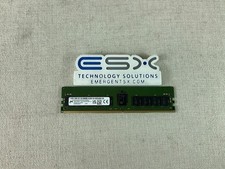
Micron MTA18ASF4G72PDZ-3G2B2 32GB 2Rx8 PC4-3200AA DDR4 ECC Server Memory RDIMM
$339.00

Supermicro 5019D-4C-FN8TP Xeon D-2123IT (4C/8T) 64GB DDR4 10GbE 480GB 1U Server
$689.00

SuperMicro 4U CSE 847 36 Bay LFF Barebone 2x 1280W w/ 2x Bays 2.5 Rear w/Trays
$499.99

Supermicro CSE-937 3U Storage Chassis No CPU No HDD No Ram Tested & Reset
$129.99

Supermicro E300-12C Mini 1U Barebone X12SCV-LVDS LGA1200 SNK-P0073A4 w/ Adapter
$225.00

 Reply With Quote