
Locksmith Management Software USB Flash Card Multiuser Windows Mac KeyHarbor For Sale

When you click on links to various merchants on this site and make a purchase, this can result in this site earning a commission. Affiliate programs and affiliations include, but are not limited to, the eBay Partner Network.

Locksmith Management Software USB Flash Card Multiuser Windows Mac KeyHarbor:
$79.99
🛍️ Product Description
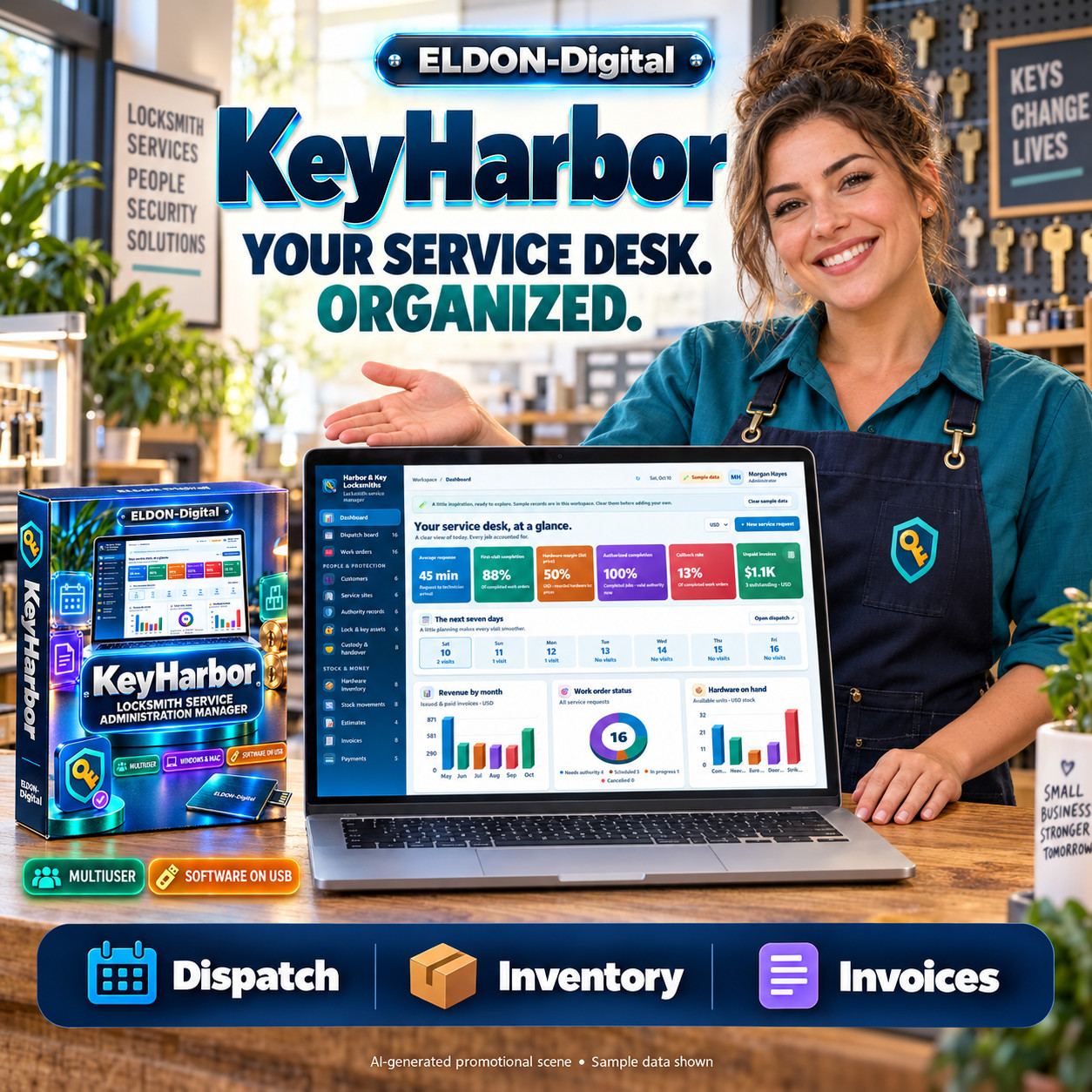
🔐 KEYHARBOR LOCKSMITHSERVICE ADMINISTRATION MANAGER
💾Software Supplied on a Physical USB Flash Card
👥Multiuser Access for Your Service Team
Bring your locksmith business into one colorful, organizedworkspace.
KeyHarbor helps you manage customers, service locations,authority references, technician schedules, hardware inventory, work orders,estimates, invoices, and payments.
This listing is for a physical USB flash card containingthe application files and documentation. Copy the complete applicationfolder to a writable location on your Windows or Mac computer, then use theincluded launch files to get started.
With bold text, colorful dashboards, professional documentexports, and administrator-controlled staff permissions, KeyHarbor provides apractical workspace for everyday locksmith service administration. 🗝️
👥 YES, KEYHARBOR IS AMULTIUSER APP
Run KeyHarbor on a Windows or Mac host computer and allowauthorized staff to access the shared workspace through a browser on the sameprivate Wi-Fi network.
💻 phone screens
🖥️Tablet access
👤Individual staff permissions
Each staff member signs in with their own account.Administrators decide which modules and actions each person can access.
The host computer must remain powered on with theapplication running. Private-network access uses the included HTTPS LANlaunchers and requires appropriate certificate trust and network configuration.
✨ MANAGE YOUR DAILY SERVICEOPERATIONS
👥 Customers andService Sites
Keep customer and property details connected.
✅ Store customer names, phonenumbers, email addresses, addresses, and notes
✅Create multiple service locations linked to the appropriate customer
✅Record site addresses and on-site contacts
✅Search customer and location records
✅Print individual records or export filtered lists
🛡️ Authority andVerification References
Document the legitimate authority behind a service request.
✅ Record the authorizing personand authority type
✅Link authority records to the correct customer and site
✅Store verification-document references
✅Track pending, verified, expired, and rejected statuses
✅Record verification and expiration dates
✅Apply authority requirements before scheduling and progressing service work
Your business performs the verification. KeyHarbor recordsthe references and status used in your workflow; it does not independentlyauthenticate identity documents.
📅 Dispatch andTechnician Scheduling
Keep upcoming work and technician assignments in view.
✅ Schedule appointments andassign technicians
✅Set routine, urgent, or emergency priorities
✅Track requested, scheduled, dispatched, in-progress, and completed work
✅Review upcoming visits on the dashboard and dispatch board
✅Open linked work orders to review service details
📝 Work Orders andService Documentation
Maintain an organized record of each visit.
✅ Link the customer, site,authority record, and technician
✅Record request, appointment, arrival, and completion times
✅Enter labor charges, hardware costs, currency, and notes
✅Track first-visit completion and callbacks
✅Record the customer’s sign-off name and time
✅Connect completed work with invoicing
🔑 Hardware Assets andCustody Handover
Track installed hardware and transferred items.
✅ Record hardware names, assetnumbers, locations, and system references
✅Track active, replaced, and retired assets
✅Document hardware changes
✅Record releasing and receiving parties
✅Capture handover quantities, dates, references, and notes
✅Produce individual handover receipts
📦 Hardware Inventoryand Stock Movements
Keep stock activity connected to service work.
✅ Maintain stock items, SKUs, andstorage locations
✅Record opening quantities, unit costs, and sale prices
✅Set reorder levels
✅Track receipts, job-related use, returns, and adjustments
✅Review stock availability and low-stock items
✅Export inventory lists and stock movement records
💰 Estimates, Invoices,and Payments
Organize the financial records associated with your jobs.
✅ Create estimates with amounts,tax rates, currencies, and validity dates
✅Track draft, sent, approved, and declined estimates
✅Prepare invoices with due dates and your business details
✅Record payments against the correct invoice
✅Review paid amounts and outstanding balances
✅Track receivables in the selected currency
KeyHarbor records payments for reconciliation. It does notprocess credit cards or connect to a payment gateway.
📊 COLORFUL DASHBOARDSAND OPERATIONAL REPORTS
Review your information through colorful cards, dimensionalcharts, and organized tables.
Dashboard indicators include:
⏱️ Average response time
✅First-visit completion
📦Hardware margin
🛡️Authorized-job completion
🔄Callback rate
💵Unpaid invoices
Five operational reports help you review:
📦 Hardware consumption
👷Technician productivity
💰Job contribution margins
🔁Repeat service
🧾Receivables
Job contribution reflects invoice subtotal less recordedhardware cost, before labor cost and overhead. It is not a net-profitcalculation.
🖨️ PROFESSIONALPRINTING AND EXPORTS
Create organized documents for customers, technicians, andinternal records.
📄 Portrait PDFsfor individual records
📋Landscape PDFs for record lists and reports
📊Excel XLSX files with formatted print and data worksheets
🗂️CSV exports for further analysis
Generate service authorizations, hardware schedules, workorders, handover receipts, stock lists, invoices, and other record summaries.
PDF and Excel print layouts use the business name, logo,contact information, and document footer saved in Settings. Long contentwraps or continues to preserve readability.
Browser PDF previews and persistent download links provideaccess to exported files. Opening documents in an external application dependson the device’s default viewer.
✉️ CUSTOMER EMAIL TEMPLATES
Prepare and review messages using your own configured SMTPaccount.
📅 requests
💬Approved-estimate summaries
🧾Service receipts
🔔Maintenance reminders
Check the recipient and message before sending. Emailscontain text summaries, while PDF documents are exported separately.
Email requires an internet connection and compatible SMTPsettings. Maintenance reminders are sent manually.
☑️ CONTROL STAFF ACCESS WITHPERMISSION CHECKBOXES
Administrators can grant or restrict access to individualmodules and actions.
👁️ View records
➕Create records
✏️Edit records
🗑️Delete records
📤Export records
✉️Email records
Only administrators can view and manage user accounts.Regular staff can update their own profile and password without accessing otherusers’ accounts.
Permissions are enforced on the server, including directrequests to restricted functions.
🎨 PERSONALIZE YOURWORKSPACE
Choose from four colorful themes:
🌊
Enjoy bold interface text, colorful navigation, highlightedactions, and adjustable text sizing from 90% to 130%.
Add your business logo and contact information, customizethe document footer, and choose a default currency.
💱 12 SUPPORTEDCURRENCIES
USD, EUR, GBP, CAD, AUD, NZD, AED, SAR, INR, ZAR, JPY, andCHF.
Financial records retain their selected currency. Currencyselection filters reports and does not perform exchange-rate conversion.
💾 LOCAL STORAGE,BACKUPS, AND ACTIVITY HISTORY
🔐 Encrypted localworkspace storage
💾Encrypted backup download
📜Access and activity logging
👥Individual accounts and permissions
🧪Optional sample records for learning
Clear sample data when you are ready to begin. Your choiceis saved, and samples stay cleared after restarting unless you explicitlyselect Reload sample data.
Backups require their matching encryption key forrestoration. Preserve that key separately in a secure backup location.
📦 WHAT IS INCLUDED
💾 One physical USBflash card containing:
✅ Native Windows application
✅Mac Intel application
✅Mac Apple Silicon application
✅Windows and Mac launch files
✅Setup, stop, and HTTPS LAN launchers
✅Colorful desktop shortcut assets
✅Complete application source code
✅31-page illustrated PDF user guide
✅Getting-started documentation
✅Final audit report with tested coverage and deployment limitations
The application package is under 20 MB.
Computers, phones, tablets, printers, and other accessoriesshown in demonstration images are not included.
🚀 HOW TO GET STARTED
1️⃣ Connect the USB flash card toyour computer.
2️⃣ Copy the complete application folder to apermanent, writable location on the host computer.
3️⃣ Use the appropriate Windows or Mac launcher.
4️⃣ Create your administrator account and businessprofile.
5️⃣ Explore the optional sample records.
6️⃣ Add staff accounts and assign permissions.
7️⃣ Configure private-network access if your team willshare the workspace.
8️⃣ Clear samples and begin entering your own verifiedbusiness records.
No Go, Python, or Node installation is required for normaluse. Your operating system may require approval to run unsigned applications.
Keep the application folder and its subfolders together.
🧰 IDEAL FOR
🔑 Independent locksmiths
🚐Mobile locksmith service teams
🏢Residential and commercial locksmith businesses
🛠️Lock and door hardware service providers
📋Small offices coordinating technicians, stock, and service paperwork
📌 COMPATIBILITY ANDIMPORTANT INFORMATION
• This listing supplies the software on a physical USB flashcard.
• The host application includes Windows x64, Mac Intel, and Mac Apple Siliconbinaries.
• Other devices access the running host through a browser on the same privatenetwork.
• Core records are stored locally. Email requires internet access.
• The host must remain running while staff use the shared workspace.
• Restricted master-key hierarchies and automated commercial service contractsare roadmap features and are not included in this release.
• CSV support is export-only. Maintenance emails are manually sent.
• Sign-off records a name and time rather than a verified electronic signature.
• The application does not include lock-bypass instructions or key-cuttingcodes.
• Windows operation and automated Chrome workflows have been tested. Macbinaries are included and cross-built, but physical Mac execution was nottested in the documented audit.
• SMTP delivery, physical printers, default viewers, and device-specificnetwork settings require configuration and verification in your environment.
• Demonstration screenshots use sample records. Illustrated product scenes arenot customer testimonials or performance guarantees.
🛒 BRING YOUR LOCKSMITHSERVICE RECORDS TOGETHER
Give your business a colorful, practical workspace formanaging customers, authorized service jobs, hardware, and invoices.
Choose KeyHarbor from Eldon-Digital, supplied on USB, andorganize your daily service administration with a multiuser workspace built foryour team. 🔐💾✨
Documentation
- Customizing Knoppix
- Remastering Knoppix
- Hard Drive Install
- Knoppix Cheat Codes
- Install Knoppix How-To